Namalsk requires the official Namalsk Island terrain Workshop item and the official Namalsk Survival gameplay Workshop item. Install both items, then set the DayZ mission/map value to the Namalsk mission in serverDZ.cfg.
- Open your DayZ server in the control panel.
- Click Backup Server before changing map or mission files.
- Click Steam Workshop.
- Search for Namalsk Survival, then install the result by Sumrak.
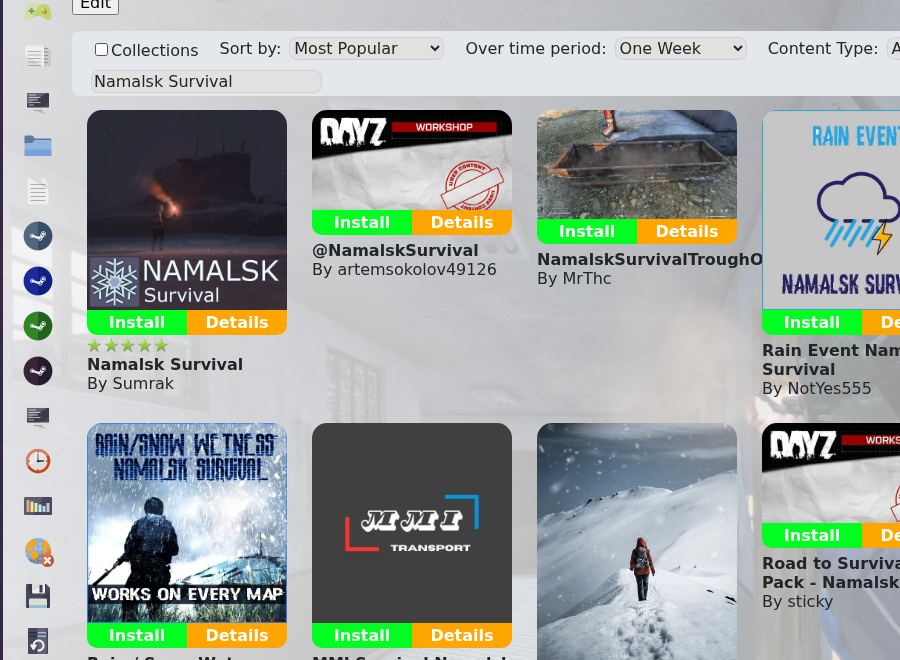
- Search for Namalsk Island, then install the official Namalsk Island Workshop item as well.
- Open Configuration Files, then open
serverDZ.cfgwith Config Editor. - Change Map to the Namalsk mission option if it is available in the dropdown. If the dropdown does not show Namalsk, open
serverDZ.cfgwith Text Editor and set the mission template to the Namalsk mission folder supplied by the map, normallydayzOffline.namalsk.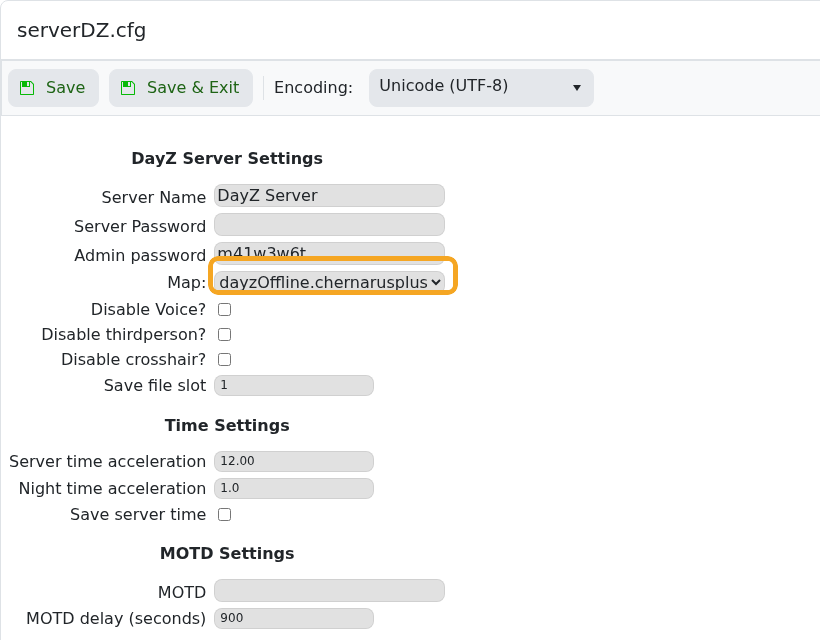
- Check the
keysfolder only if the server reports missing key errors after restart. Do not randomly move keys if the Workshop installer already copied them. - Restart the server, then check the startup log for missing mod, missing key, or mission template errors.
Do not switch a live Chernarus or Livonia save directly onto Namalsk without a backup. Namalsk uses its own map and mission setup, so treat this as a map change and test it before sending players to the server.
