Use SCUM’s direct connection option when you have the server address, including when the server is missing from the browser list.
- Open your SCUM service in the game panel. If it is stopped, click Start and wait for the game to finish loading. In Log Viewer, the current
SCUM.logshould showThe_Islandbroughtup for playand anIpNetDriver listening on portline. - Note the address under Query Info. For this SCUM panel layout, that is also the client response address used for direct connections. Its port is two higher than the launch port shown under Connection Info. For example, a launch port of
28015gives a joining port of28017. Use your own service’s address; do not add two again to the port already shown under Query Info. RCON Info is not a joining address.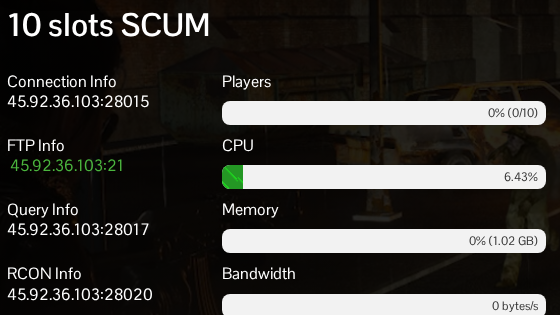
- Launch SCUM and open the multiplayer server browser. Choose Direct Connect and enter the IP address and joining port together, separated by a colon. Do not include a web prefix such as
https://. - Start the connection. If asked for a password, use the server’s joining password. This is the value of
scum.ServerPassword, not your game-panel password.
If a version mismatch is reported, update both the server and your game client before trying again. A missing browser entry does not by itself mean the server is offline; SCUM’s developers recommend Direct Connect when the master-server list does not show it.
