如何更改您的 Insurgency: Sandstorm 服务器名称

列印
  • 9

服务器浏览器中显示的名称来自活动的命令行。想要更改它而不修改提供的默认设置时,请创建一个自定义配置档。

  1. 停止服务器并打开 Commandline Manager
  2. 选择 Custom Commandlines,然后点击 New
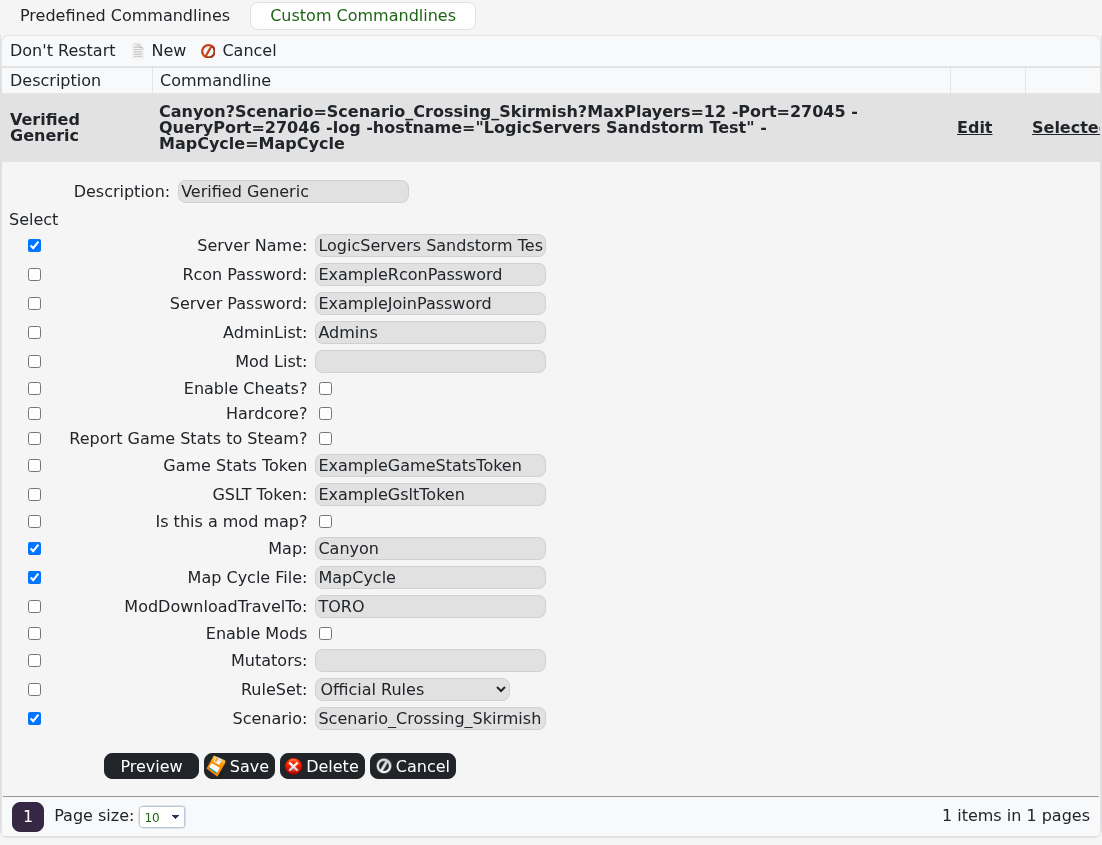
  3. 为该配置档提供清晰的描述,勾选 Server Name,并输入玩家应看到的名称。
  4. 选择服务器应启动的地图和场景,然后点击 Save

    Insurgency Sandstorm 自定义命令行,已选中 Server Name 选项

  5. 在已保存的配置档旁点击 Select 并启动服务器。

让游戏内浏览器刷新几分钟。如果仍显示旧名称,请返回 Commandline Manager 并确认已选中自定义配置档。


這篇文章有幫助嗎?

相關文章

« 返回

Follow us on Social Media

Stay in the loop! Follow our social media accounts and stay up-to-date with the latest news, announcements, tips & tricks and behind-the-scenes insights!