如何备份你的 Citadel: Forged With Fire 服务器

列印
  • 0

在进行可能影响已保存世界或服务器文件的更新、配置更改或其他操作之前,请手动为你的 Citadel: Forged With Fire 服务器创建备份。

  1. 在控制面板中打开你的 Citadel: Forged With Fire 服务器。
  2. 停止服务器并等待状态完全显示为已停止。
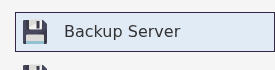
  3. 单击 Backup Server.

    Backup Server button for a Citadel Forged With Fire server

  4. 等待备份任务完成。在任务运行时,不要重启服务器或编辑其文件。
  5. 备份成功完成后重新启动服务器。

记录备份的时间和原因,以便日后识别正确的恢复点。如果任务报告错误,请不要依赖该备份;请重试备份或在进行计划更改之前提交支持工单。


這篇文章有幫助嗎?

相關文章

« 返回

Follow us on Social Media

Stay in the loop! Follow our social media accounts and stay up-to-date with the latest news, announcements, tips & tricks and behind-the-scenes insights!