如何加入您的 Day of Dragons 服务器

列印
  • 0

您的 Day of Dragons 服务器会通过游戏内的服务器浏览器公布其分配的名称。LogicServers 服务页面会显示该列表使用的游戏和查询地址。

  1. 打开 Day of Dragons 服务并确认该服务正在运行。
  2. 记下服务器名称以及完整的 Connection Info 和 Query Info 值。
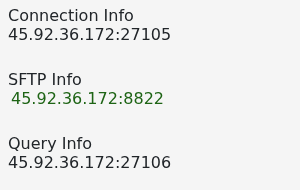
    Day of Dragons Connection Info and Query Info addresses

  3. 启动 Day of Dragons 并打开其多人服务器浏览器。
  4. 搜索完整的服务器名称,选择它并加入。

如果未显示,请刷新浏览器并在启动服务后等待几分钟。检查您的游戏是否已完全更新;服务器必须与游戏处于相同版本,玩家才能加入。


這篇文章有幫助嗎?

相關文章

« 返回

Follow us on Social Media

Stay in the loop! Follow our social media accounts and stay up-to-date with the latest news, announcements, tips & tricks and behind-the-scenes insights!