如何加入 Foundry 服务器

列印
  • 0

您可以使用 TCAdmin 中显示的游戏地址直接连接。使用主 Connection Info 端口,而不是 FTP、Query 或 RCON 端口。

  1. 在 TCAdmin 中打开 Foundry 服务,并从 Connection Info 复制 IP 地址和端口。
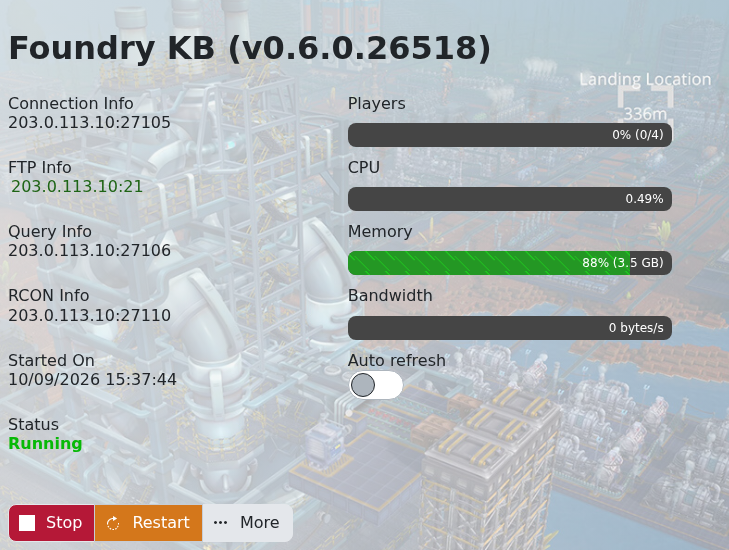
    Foundry game server connection information in TCAdmin

  2. 启动 Foundry 并打开 Multiplayer
  3. 选择 IP Direct Connect
  4. 输入服务器 IP 和游戏端口,然后连接。如设置了服务器密码,请输入密码。

如果连接失败,请确认服务状态为 Running,并且您的游戏是最新版本。公共服务器也可能出现在服务器浏览器中,但直接连接可避免列表刷新时的延迟。


這篇文章有幫助嗎?

相關文章

« 返回

Follow us on Social Media

Stay in the loop! Follow our social media accounts and stay up-to-date with the latest news, announcements, tips & tricks and behind-the-scenes insights!