如何更新 Medieval Engineers 服务器

列印
  • 0

当玩家遇到版本不匹配或发布了 Medieval Engineers dedicated-server 更新时,运行 Steam Update。

  1. 要求玩家断开连接并创建当前的备份。
  2. 停止服务器。
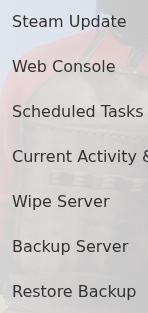
  3. 打开 More 并点击 Steam Update

    Medieval Engineers Steam Update, Backup Server and Restore Backup actions in TCAdmin

  4. 在启动服务之前,等待更新任务完成。
  5. 通过 Steam 更新游戏,然后重新连接。

如果服务之后无法启动,请检查 worlds/MedievalEngineersDedicated.log 中最近一次启动的第一个错误。在更新任务仍在运行时,避免反复启动服务。


這篇文章有幫助嗎?

相關文章

« 返回

Follow us on Social Media

Stay in the loop! Follow our social media accounts and stay up-to-date with the latest news, announcements, tips & tricks and behind-the-scenes insights!