如何备份并恢复 Medieval Engineers 服务器

列印
  • 0

在编辑配置、更改世界或运行更新之前创建备份。对于大型世界操作,还应通过 FTP 下载 worlds 文件夹,以便保留一份单独的存档副本。

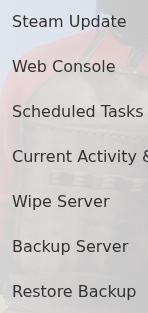
  1. 停止服务器,打开 More 并点击 Backup Server

    Medieval Engineers Steam Update, Backup Server and Restore Backup actions in TCAdmin

  2. 确认操作并等待备份任务完成。

若要还原面板备份,请保持服务停止,打开 Restore Backup,选择所需日期的归档,勾选 Are you sure? 然后点击 Execute

Medieval Engineers Restore Backup archive selector in TCAdmin

还原操作恢复了对主配置的已测试更改。还原后,请检查 worlds/Saves/World 下的文件,启动服务器并加入游戏,然后再删除任何更新的备份或 FTP 副本。


這篇文章有幫助嗎?

相關文章

« 返回

Follow us on Social Media

Stay in the loop! Follow our social media accounts and stay up-to-date with the latest news, announcements, tips & tricks and behind-the-scenes insights!