Longvinter 可以在岛上的告示牌上显示每日消息。你可以用它发送简短的欢迎语或公布岛屿规则,并附上社区链接。
- 登录游戏控制面板,打开 Longvinter 服务,然后点击 Stop。编辑
Game.ini前,请等待服务器停止,因为正在运行的服务器可能会覆盖更改。 - 打开 Configuration Files,然后点击
Game.ini旁边的 Config Editor。 - 更改 Message of the Day 和 Community Website。输入你希望玩家使用的网站或邀请链接。
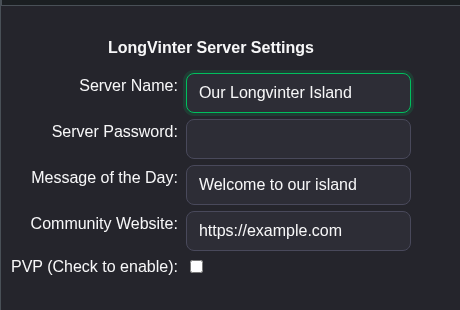
- 点击 Save & Exit,返回服务页面,然后点击 Start。
你也可以使用 Game.ini 旁边的 Text Editor。保留现有的节标题,只修改对应的行,不要重复添加一份。
[/game/blueprints/server/gi_advancedsessions.gi_advancedsessions_c]
ServerMOTD=Welcome to our island
CommunityWebsite=https://example.com
你也可以通过 File Manager 打开 Saved/Config/WindowsServer/Game.ini,或使用 FTP 下载并编辑该文件。File Manager 会打开 Longvinter 文件夹,因此请从 Saved 开始。
