将您的《7 Days to Die》服务器设为私有的最简单方法是添加服务器密码。玩家需要该密码才能加入。
在更改密码之前,请先停止您的服务器。
添加服务器密码
在控制面板中打开您的《7 Days to Die》服务器,然后点击配置文件。
首先使用配置编辑器打开serverconfig.xml。这通常是更新服务器名称和密码的最简单方法。如果在配置编辑器中未显示密码字段,请使用文本编辑器打开文件并搜索ServerPassword。
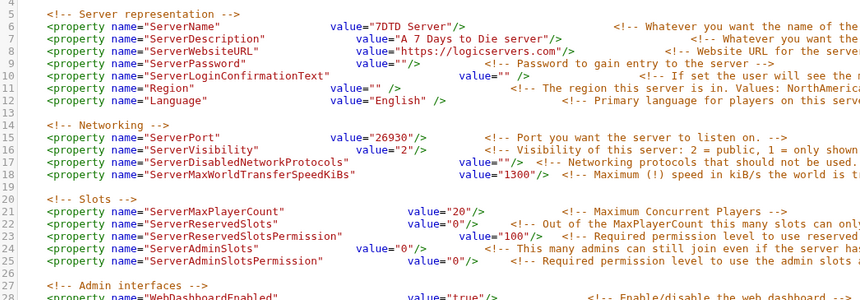
将ServerPassword设置为您希望玩家使用的密码:
<property name="ServerPassword" value="YourPasswordHere"/>
保存文件,然后重新启动您的服务器。
如果您希望服务器更难被找到,您还可以检查serverconfig.xml中的服务器可见性设置。密码仍然是阻止其他玩家加入的主要因素。
要再次将服务器设为公开,请清除密码值并重启服务器。
