自然物体和合成物体有各自独立的重生开关和自定义计时值。
- 在游戏面板中打开你的 Night of the Dead 服务,然后点击 Stop。等待状态显示为 Stopped。
- 打开 Configuration Files,然后点击
ServerSettings.ini旁边的 Text Editor。请在对应区段中编辑现有键值,不要添加重复区段。 - 在
[GameSettings/General]下,将两个重生开关都设为1。[GameSettings/General] NaturalObjectRespawn=1 SyntheticObjectRespawn=1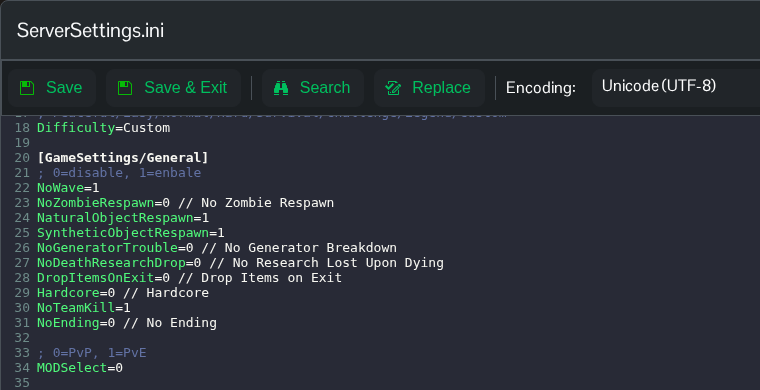
- 如需自定义计时器,请在
[GameSettings]下设置Difficulty=Custom。编辑[GameSettings/Advanced]下已有的键值。此示例为两项都使用受支持的值240。[GameSettings/Advanced] NaturalObjectRespawnTime=240 SyntheticObjectRespawnTime=240
- 点击 Save & Exit,然后返回服务页面并点击 Start。
提供的文件列出了计时器值 240, 360, 480, 720, 840, 960, 1200。文件未说明这些值的时间单位,因此请将它们视为游戏设置值。请使用 Text Editor,因为面板中的资源重生控件不会在当前配置中更新这些开关。
