清除世界将移除当前的Minecraft地图,并让服务器生成一个新的地图。如果您可能需要旧世界,请先备份服务器。
重置世界
- 停止服务器,然后在控制面板中打开文件。
- 找到当前的世界文件夹。默认的Java文件夹通常是
world。如果不确定,请打开server.properties并检查level-name设置。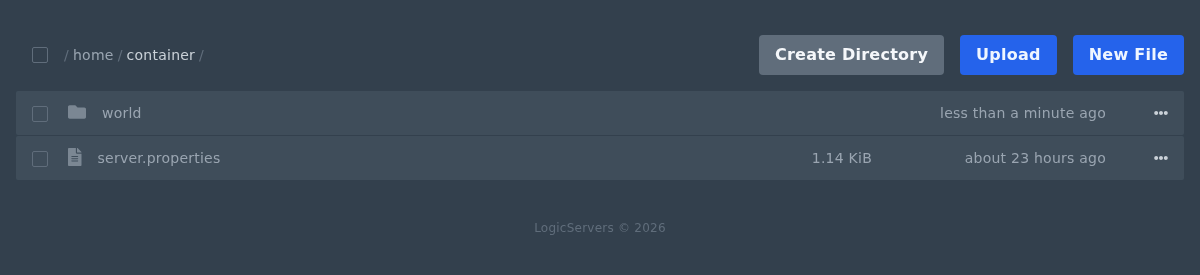
- 打开世界文件夹的菜单。如果您想完全清除它,请删除它;如果您想在服务器上保留一个副本,请重命名它。
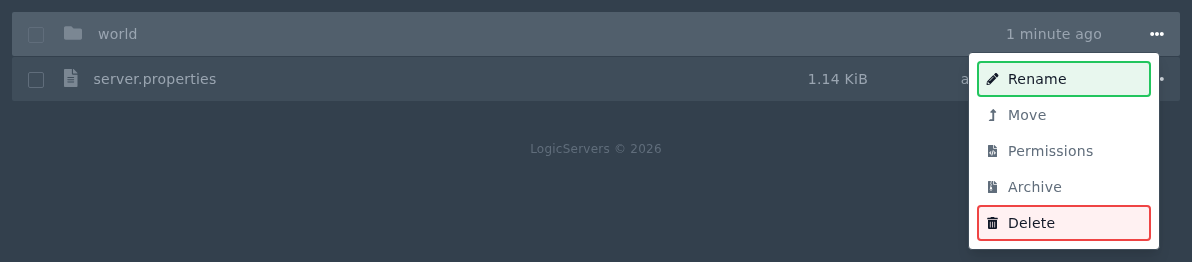
- 如果您的服务器有单独的下界或末地文件夹,例如
world_nether和world_the_end,如果您想要完全重置,也请删除它们。 - 重新启动服务器。Minecraft将使用当前的服务器设置创建一个新的世界文件夹。
模组服务器可能使用不同的世界文件夹名称。如果不确定,请检查server.properties或模组包文档。
