当您已经有一个Icarus前景.json文件并希望专用服务器加载它时使用此方法。如果您只想创建一个新的世界,请使用如何在您的Icarus服务器上创建一个世界。
Icarus专用服务器的前景存储在Icarus/Saved/PlayerData/DedicatedServer/Prospects。
- 在控制面板中打开您的Icarus服务器并停止服务器。
- 首先进行备份:如何备份您的Icarus服务器。
- 点击文件管理器。
- 打开
Icarus/Saved/PlayerData/DedicatedServer/Prospects。如果路径中缺少任何文件夹,请创建它们。 - 点击上传,然后上传前景
.json文件。在游戏中创建的前景会保存为JSON文件,例如my prospect.json。对于SFTP上传,请在FileZilla中使用相同的文件夹路径:如何使用FileZilla连接到SFTP。
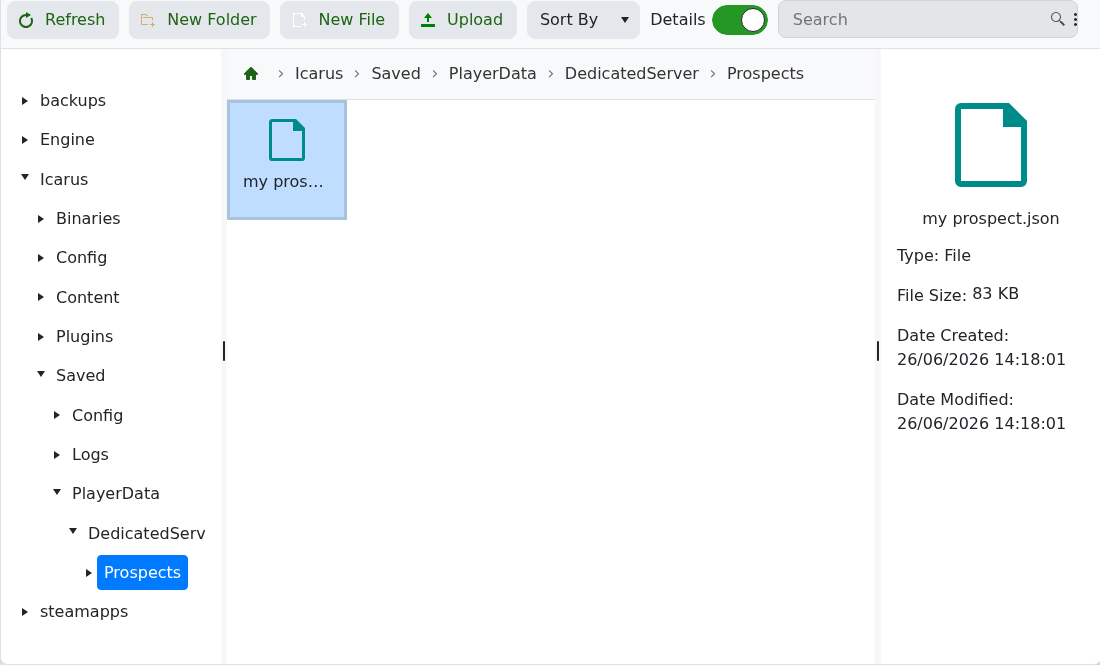
- 从JSON文件名中复制前景名称。例如,
my prospect.json的前景名称是my prospect。 - 使用如何更改您的Icarus服务器加载的前景设置服务器加载该前景。
- 启动服务器并在游戏中测试。
