How to join your Day of Dragons server

Your Day of Dragons server advertises its assigned name through the in-game server browser. The LogicServers service page shows the game and query addresses used by that listing.

  1. Open the Day of Dragons service and make sure it is running.
  2. Note the server name and the full Connection Info and Query Info values.
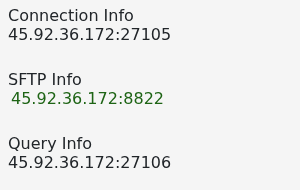
    Day of Dragons Connection Info and Query Info addresses

  3. Start Day of Dragons and open its multiplayer server browser.
  4. Search for the exact server name, select it and join.

If it does not appear, refresh the browser and allow a few minutes after starting the service. Check that your game is fully updated; the server must be on the same version before it will be ready for players.

  • 0 Users Found This Useful
Was this answer helpful?

Related Articles

Admin commands for Day of Dragons

Use these Day of Dragons commands in-game. Some commands require admin permissions and a player...

How to configure your Day of Dragons server

Day of Dragons uses Game.ini for its player limit, access lists and gameplay rules. Stop the...

How to make a player admin on your Day of Dragons server

Day of Dragons grants administrator access by SteamID64. Add one sServerAdmins entry for each...

How to whitelist your Day of Dragons server

The Day of Dragons join list restricts the server to approved Steam accounts. Have every player's...

How to add a player to the Day of Dragons ban list

The sServerBanList entries in Game.ini block listed Steam accounts when the server starts. Copy...