How to join your Miscreated server

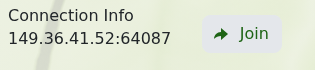
The service page shows the game address and a Join button once Miscreated is running.

  1. Open the Miscreated service and wait for its status to show Running.
  2. Find Connection Info and click Join.

    Miscreated Connection Info address and Join button

  3. Allow Steam to open Miscreated when your browser asks.

You can also search for the server name in Miscreated's server browser. If it does not appear immediately, wait a few minutes after startup, refresh the list and confirm that both your game and the server are updated.

  • 0 Users Found This Useful
Was this answer helpful?

Related Articles

Configuration settings for your Miscreated server

Miscreated keeps its main server settings in hosting.cfg. The panel provides both a configuration...

Commands for your Miscreated server

These Miscreated commands can be used for common server administration tasks. Enter commands...

How to install mods on your Miscreated server

Miscreated loads Steam Workshop items from the steam_ugc value in hosting.cfg. Use the numeric...

How to whitelist players on your Miscreated server

Miscreated's whitelist uses 17-digit SteamID64 values in whitelist.xml. The whitelist is enforced...

How to use the Canyonlands map on your Miscreated server

The Miscreated package includes a tested Canyonlands Default command line, so you do not need to...