How to change gathering resource and XP rates in Voyagers of Nera

Gathering, resource respawn and experience rates are in CustomGameUserSettings.ini.

  1. Back up and stop the server.
  2. Open Configuration Files and use the CustomGameUserSettings.ini Config Editor.
  3. Change Gathering Rate Multiplier, Resource Spawn Rate Modifier or XP Gain Rate Modifier.
  4. Save and start the server, then test one change before adjusting another.
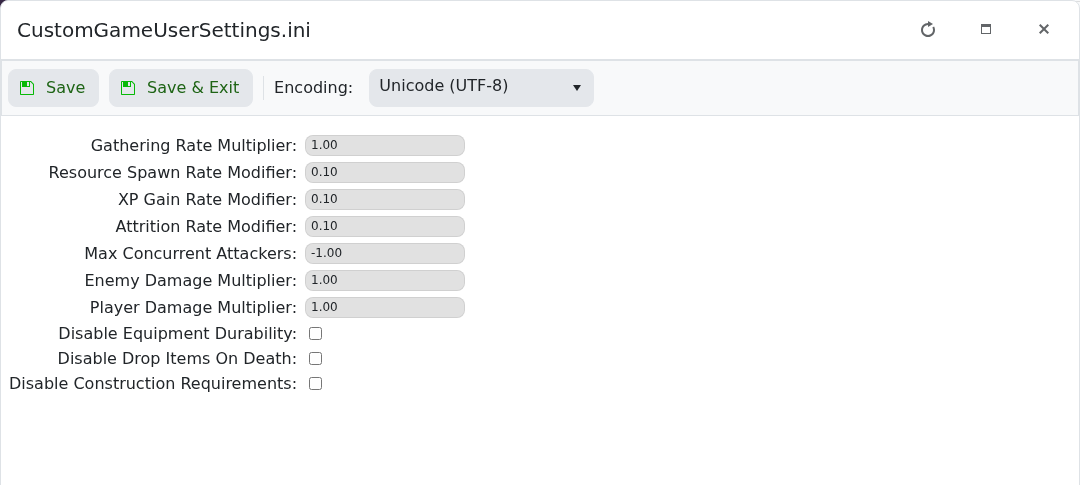
Voyagers of Nera advanced gathering resource and XP rate settings

A multiplier of 1.00 means the normal rate. Avoid large jumps: extreme values can make progression or resource availability difficult to balance.

  • 0 Users Found This Useful
Was this answer helpful?

Related Articles

How to back up your Voyagers of Nera server

Create a backup before changing server settings, updating the game or working with persisted...

How to change your Voyagers of Nera server name

The server name is stored in CustomHostServerUserSettings.ini and is available through the basic...

How to change your Voyagers of Nera server password

A join password keeps the server private. It is stored beside the server name in...

How to find and join your Voyagers of Nera server

Voyagers of Nera servers are joined through the in-game browser using the server name configured...

How to change the autosave interval on your Voyagers of Nera server

The basic configuration editor exposes Auto Save Timer. The current package default is 300. Stop...