Soulmask stores its automatic save and in-game backup intervals in seconds. These are separate from the manual Backup Server action in TCAdmin.
- Stop the server and open
Engine.iniwith the Text Editor. - Under
[Dedicated.Settings], setsavingto the save interval andbackupto the backup interval.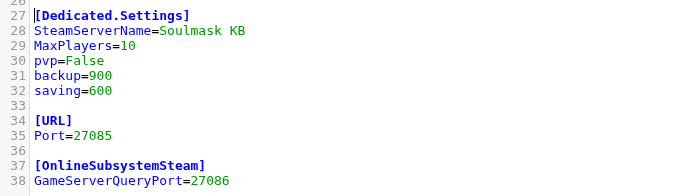
- Click Save & Exit and start the server.
saving=600
backup=900
This example saves every ten minutes and creates an in-game backup every fifteen minutes. Very short intervals increase disk activity, while long intervals increase the progress that can be lost after an unexpected stop.
