Natural and synthetic objects have separate respawn switches and custom timing values.
- Open your Night of the Dead service in the game panel and click Stop. Wait for it to show Stopped.
- Open Configuration Files, then Text Editor beside
ServerSettings.ini. Edit the existing keys in their matching sections rather than adding duplicate sections. - Under
[GameSettings/General], set both respawn switches to1.[GameSettings/General] NaturalObjectRespawn=1 SyntheticObjectRespawn=1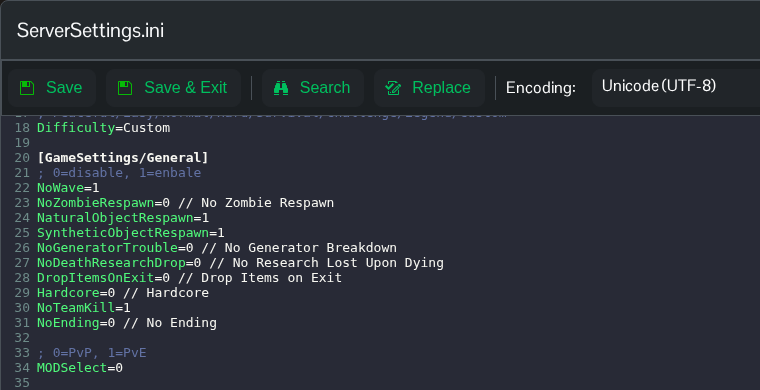
- For custom timers, set
Difficulty=Customunder[GameSettings]. Edit the existing keys under[GameSettings/Advanced]. This example uses the supported value240for both.[GameSettings/Advanced] NaturalObjectRespawnTime=240 SyntheticObjectRespawnTime=240
- Click Save & Exit, then return to the service page and click Start.
The supplied file lists timer values 240, 360, 480, 720, 840, 960, 1200. It does not identify their time unit, so treat them as game setting values. Use Text Editor because the panel’s resource respawn control does not update these switches in the current configuration.
