要查找您的Steam群组ID,首先获取您的Steam群组的URL。它看起来类似于:
https://steamcommunity.com/groups/nameofgroup
然后在URL的末尾添加以下内容:
/memberslistxml/?xml=1
这将为您提供一个类似于以下的URL:
https://steamcommunity.com/groups/nameofgroup/memberslistxml/?xml=1
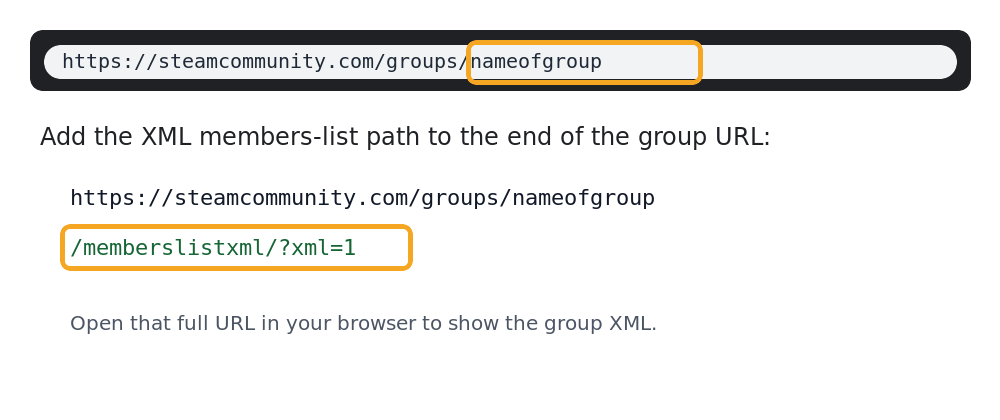
页面将显示XML代码。在顶部附近,查找<groupID64>。例如:
<memberList>
  <groupID64>103249292485930254</groupID64>
</memberList>
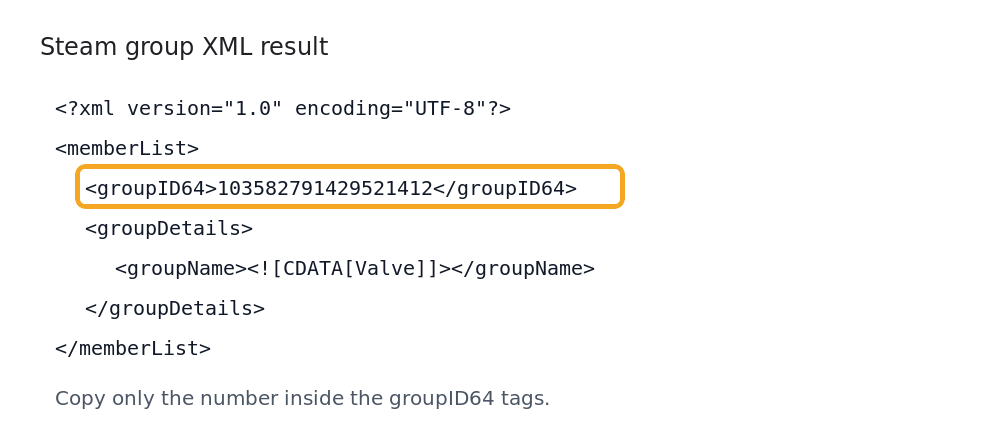
从<groupID64>标签中复制数字。该数字就是您的Steam群组ID。
在启用Steam群组白名单时,您可以在Space Engineers服务器上使用该ID。
旧方法
确保您是Steam群组的成员并已登录您的Steam账户。在群组页面上,点击邀请好友。群组ID可能会显示为URL栏末尾的一个长数字。在Steam应用中,首先启用显示Steam URL栏的设置。
