您的 Hurtworld 服务页面在服务器运行时会显示用于连接的地址和一个加入按钮。
- 打开 Hurtworld 服务,并等待其状态显示为 正在运行。
- 在 连接信息 下找到完整的 IP 地址和端口号。
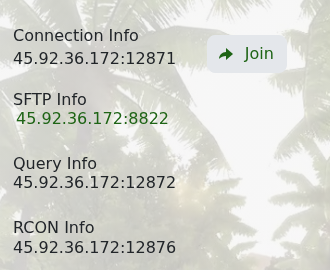
- 单击 加入,通过 Steam 打开 Hurtworld。
- 如果游戏内出现提示,选择服务器并连接。
如果服务器没有响应,启动后等待几分钟并刷新服务页面。检查您电脑上的 Hurtworld 是否已完全更新,如果版本不同,请在服务器上运行 Steam Update。
您的 Hurtworld 服务页面在服务器运行时会显示用于连接的地址和一个加入按钮。
如果服务器没有响应,启动后等待几分钟并刷新服务页面。检查您电脑上的 Hurtworld 是否已完全更新,如果版本不同,请在服务器上运行 Steam Update。
