如何更改 Voyagers of Nera 中的采集、资源与经验倍率

列印
  • 0

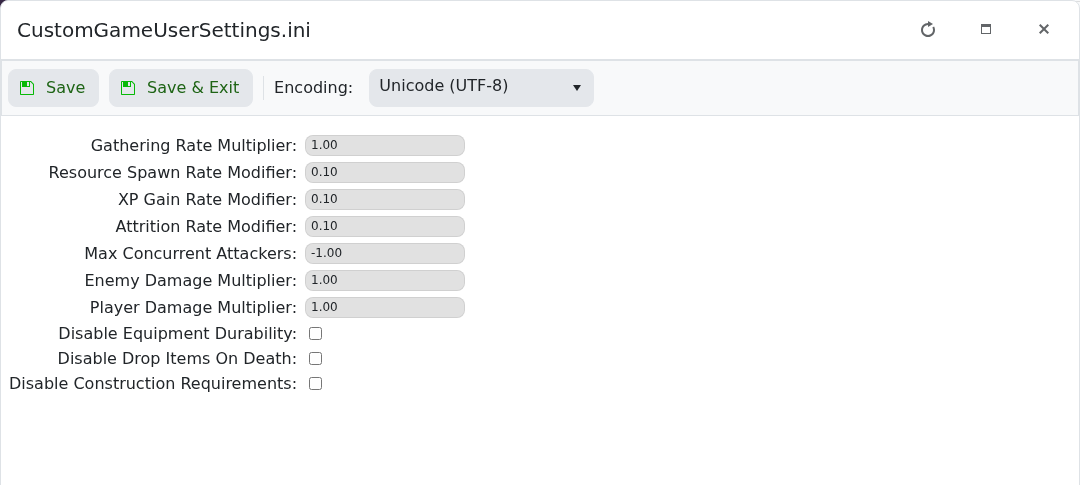
采集、资源刷新与经验倍率位于 CustomGameUserSettings.ini 中。

  1. 备份并停止服务器。
  2. 打开 Configuration Files,并使用 CustomGameUserSettings.ini 的 Config Editor。
  3. 更改 Gathering Rate Multiplier、Resource Spawn Rate Modifier 或 XP Gain Rate Modifier。
  4. 保存并启动服务器,先测试一项更改,然后再调整其他设置。

Voyagers of Nera 高级采集、资源与经验倍率设置

倍率 1.00 表示正常速率。避免大幅跳跃:极端数值会使进度或资源可用性难以平衡。


這篇文章有幫助嗎?

相關文章

« 返回

Follow us on Social Media

Stay in the loop! Follow our social media accounts and stay up-to-date with the latest news, announcements, tips & tricks and behind-the-scenes insights!