如何修复 Insurgency: Sandstorm 服务器上的 StartError

列印
  • 0

当没有启用命令行或自定义配置文件包含无效的地图、场景或选项时,可能会发生 StartError。

  1. 打开 Commandline Manager
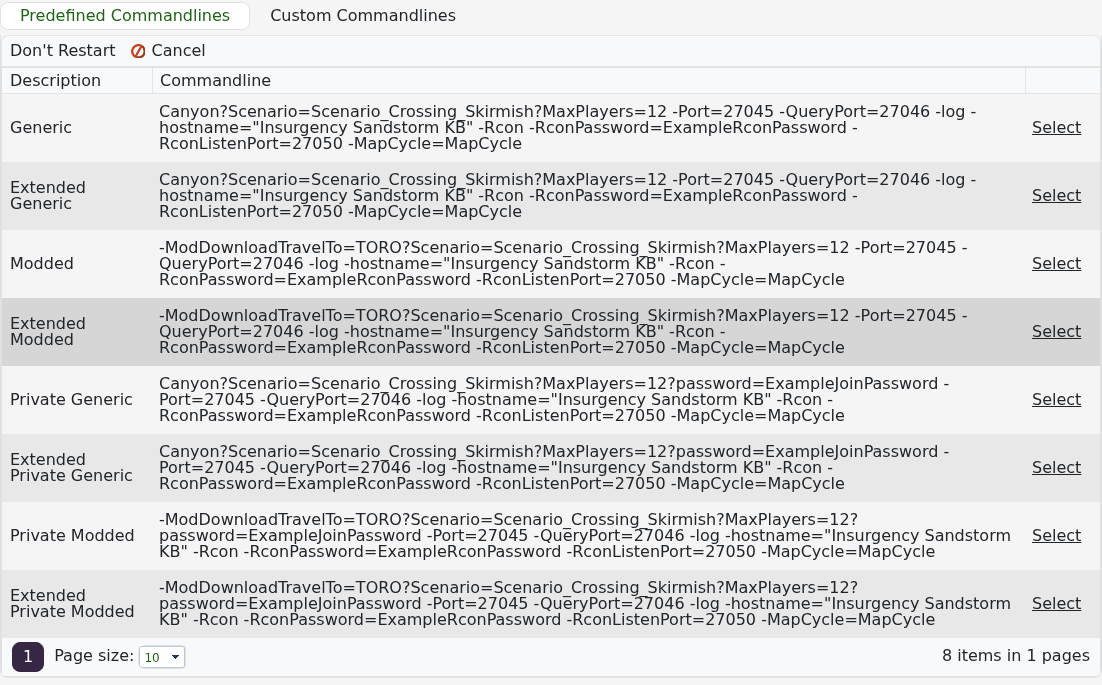
  2. Predefined Commandlines 下,点击普通 Generic 配置旁的 Select

    Insurgency Sandstorm predefined command lines with Select actions

  3. 启动服务。如果服务运行,重建自定义配置文件并检查其地图和场景值。
  4. 如果 Generic 也失败,停止服务,运行 Steam Update,然后再试一次。
  5. 打开 Saved/Logs/Insurgency.log 并检查最近一次尝试中的第一个错误。

不要反复重装服务器。如果所选的 Generic 配置和完成的 Steam Update 仍然返回 StartError,请在支持工单中提交最新的日志行。


這篇文章有幫助嗎?

相關文章

« 返回

Follow us on Social Media

Stay in the loop! Follow our social media accounts and stay up-to-date with the latest news, announcements, tips & tricks and behind-the-scenes insights!