server_config.sii 控制玩家上限以及每位连接玩家可生成的 AI 交通量。不要同时更改它们旁边的 dedicated 或 virtual 端口值。
- 停止服务器,打开 配置文件 并为
server_config.sii选择 文本编辑器。 - 将
max_players设置为不高于服务分配的槽位数。 - 如果 AI 交通过多,请调整
max_vehicles_total、max_ai_vehicles_player和max_ai_vehicles_player_spawn。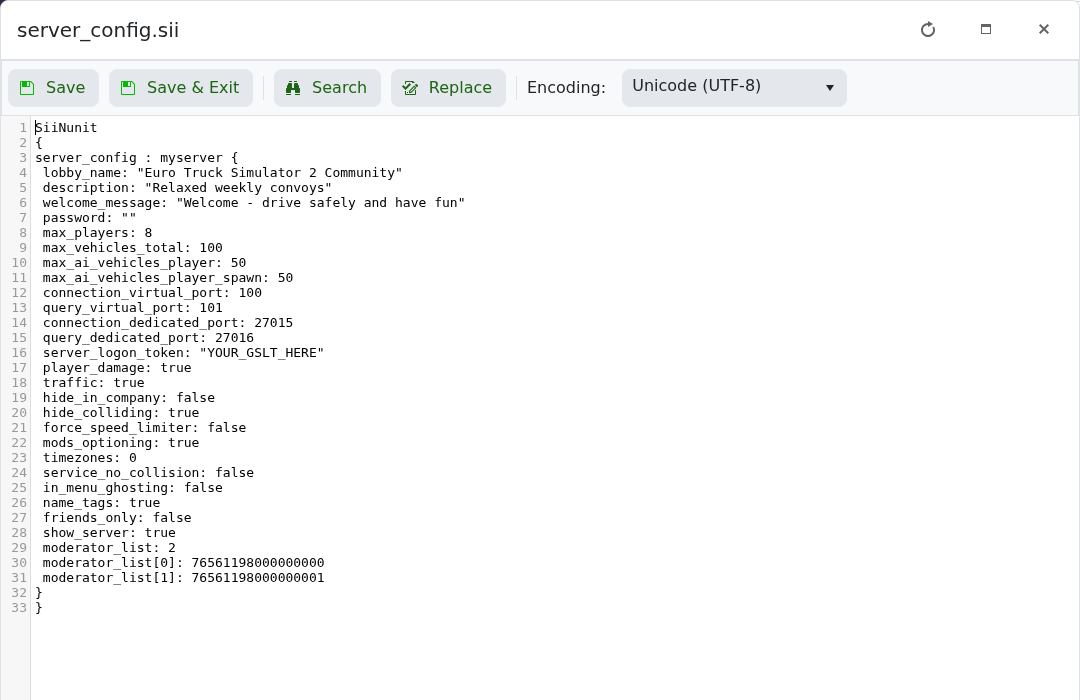
- 点击 保存并退出 并启动服务器。
max_players: 8
max_vehicles_total: 100
max_ai_vehicles_player: 50
max_ai_vehicles_player_spawn: 50
当会话在负载下出现问题时,先降低 AI 限制。非常高的值会增加 CPU 使用和每位连接玩家的交通密度。
