如果您只想让自己的群组使用 Stormforge 服务器,可以设置加入密码。朋友需要在游戏的 Direct IP 菜单中输入此密码;该密码与您的 TCAdmin 登录密码不同。
使用 Config Editor
- 在 TCAdmin 中打开您的 Stormforge 服务并停止服务器。
- 点击Configuration Files,然后点击
settings.json旁边的 Config Editor。 - 在 Server Password 中输入您想设置的密码。
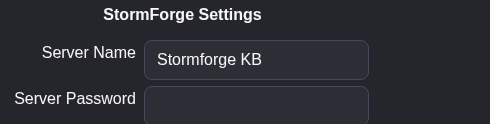
- 点击Save & Exit,然后启动服务器。
- 将密码告知您的群组,并按照Stormforge 服务器加入指南进行连接。
要移除密码,请停止服务器,清空 Server Password,保存后重新启动服务器。
使用文本编辑器
停止服务器后,打开配置文件,并选择 settings.json 旁边的Text Editor。修改现有的 password 条目:
"password": "MyPrivatePassword"保留文件中的其他内容不变。使用空字符串("password": "")移除加入密码。点击保存并退出,然后重新启动服务器。
