“死亡惩罚”设置用于控制玩家死亡时会掉落什么。你可以使用“自定义”世界预设,独立于战斗难度更改此设置。
使用配置编辑器
- 在 TCAdmin 中停止 Stormforge 服务器。
- 打开Configuration Files,然后打开
settings.json的Config Editor。 - 将World Preset设为Custom,然后选择Death Penalty。
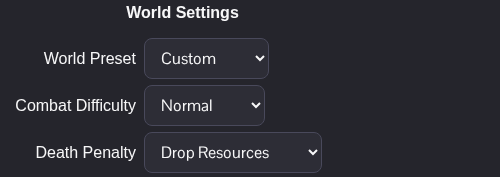
- 点击Save & Exit,然后重新启动服务器。
| 选项 | JSON 值 |
|---|---|
| Keep All | KeepAll |
| Drop Resources | DropRecoverable |
| Drop All | DropAll |
使用下拉菜单比自行编辑 JSON 值更简单。如果你从其他世界预设切换而来,请在保存前检查其他自定义选项,确保它们符合你们群组的玩法偏好。
使用文本编辑器
停止服务器,然后在“配置文件”中打开 settings.json 的Text Editor。在 worldSettings 中,将现有条目更改为自定义预设和所选的死亡惩罚。以下示例使用“保留全部”:
"worldPreset": "Custom",
"deathPenalty": "KeepAll"
其他选项请使用上表中的 JSON 值。保留其余世界设置,保存并重新启动服务器。
