如果想让你的 Necesse 世界保持私密,请在 cfg/server.cfg 中设置加入密码。玩家连接时需要输入该密码。
- 在 TCAdmin 中停止服务器,并等待状态显示为 Stopped。
- 打开 Configuration Files,然后点击
server.cfg旁边的 Text Editor。 - 找到
password条目。在等号和逗号之间输入你自己的密码,并保留逗号。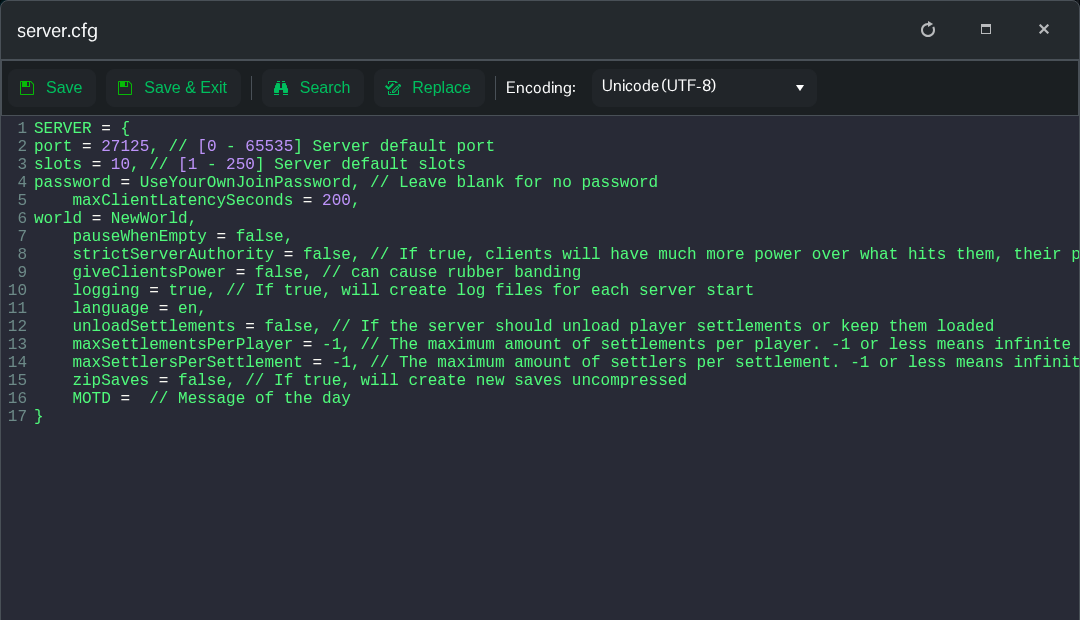
- 点击 Save & Exit,然后启动服务器。
- 重新连接到服务器,并将新密码提供给你想邀请的玩家。
例如,将下方的 YourOwnPassword 替换为你想使用的密码。
password = YourOwnPassword,要移除密码,请将其值留空,保存并重启服务器。
password = ,此文件的 Config Editor 目前显示的是世界名称,因此请使用 Text Editor 设置密码。
