如何从备份恢复您的 Vintage Story 服务器

列印
  • 0

当您在更新失败、模组安装损坏、不想要的配置更改、存档上传或世界问题后需要将服务器回滚时,请恢复 Vintage Story 备份。恢复将使用所选备份替换当前的服务器文件。

  1. 在控制面板中打开您的 Vintage Story 服务器。
  2. 停止服务器。
  3. 单击 恢复备份,或打开面板的 备份 部分并选择恢复选项。
  4. 选择要恢复的备份。使用时间戳来选择正确的还原点。
  5. 在提示时确认恢复。
  6. 等待恢复任务完成。
  7. 启动服务器并检查预期的存档或配置是否已加载。

如果您是因为模组或配置更改失败而进行恢复,请在确定问题原因之前不要重新应用相同的更改。如果您不确定要恢复哪个备份,请在覆盖当前文件之前 提交支持工单。
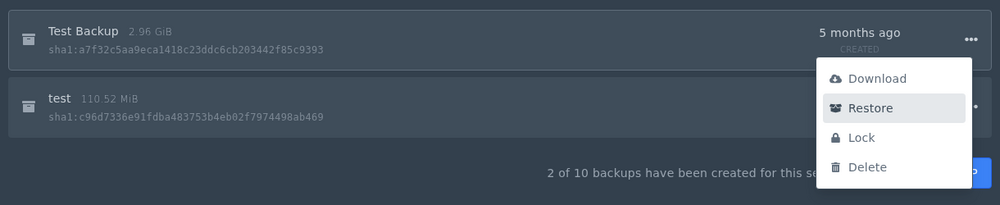
如何从备份恢复您的 Vintage Story 服务器 - 566 Vintage Story 恢复菜单


這篇文章有幫助嗎?

相關文章

« 返回

Follow us on Social Media

Stay in the loop! Follow our social media accounts and stay up-to-date with the latest news, announcements, tips & tricks and behind-the-scenes insights!
