在服务器停止运行时进行更新,然后检查游戏启动日志。
- 在游戏面板中打开你的 SCUM 服务,点击 Stop,并等待显示 Stopped。
- 使用 File Manager,为你的
SCUM/Saved数据分别保留副本,包括配置文件和存档文件。你也可以使用 FTP 传输此文件夹。请将这些副本保存在服务器之外。 - 点击 Steam Update 并确认。打开更新页面后,SteamCMD 会启动。
- 等待出现
Success! App '3792580' fully installed.和The process has completed.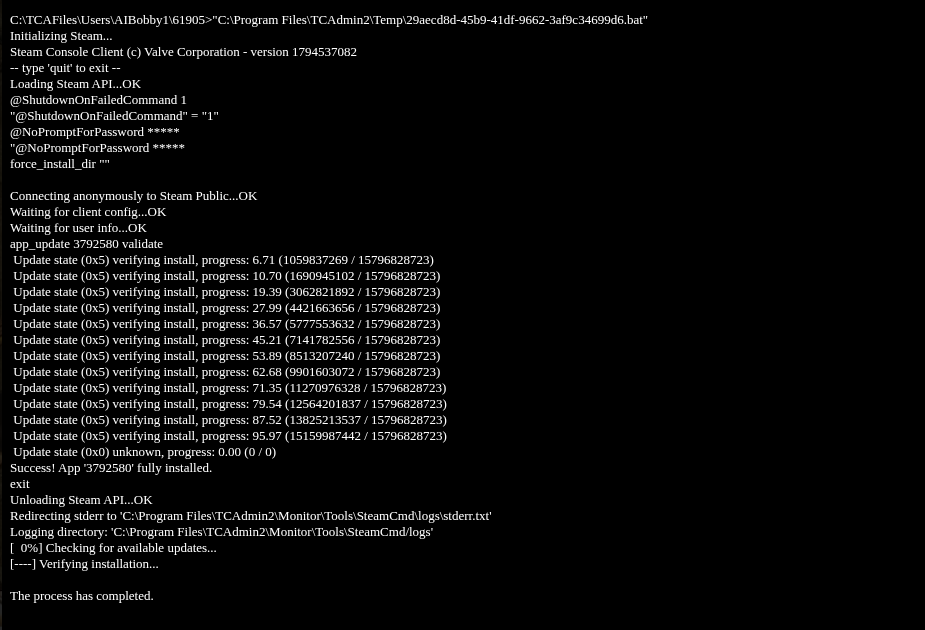
- 返回服务页面并点击 Start。打开 Log Viewer 并检查当前的
SCUM.log。查找针对The_Island的Bringing World行,其中包含up for play,同时还应有一行IpNetDriver listening on port。 - 重新打开 Configuration Files,然后点击
ServerSettings.ini旁边的 Text Editor 检查设置,再确认玩家能够使用匹配的游戏版本加入。
