How to configure your Blackwake server

Blackwake's main settings are in the server.cfg Config Editor. Separate editors manage administrators, moderators and announcements.

  1. Open the service, take a backup and stop the server.
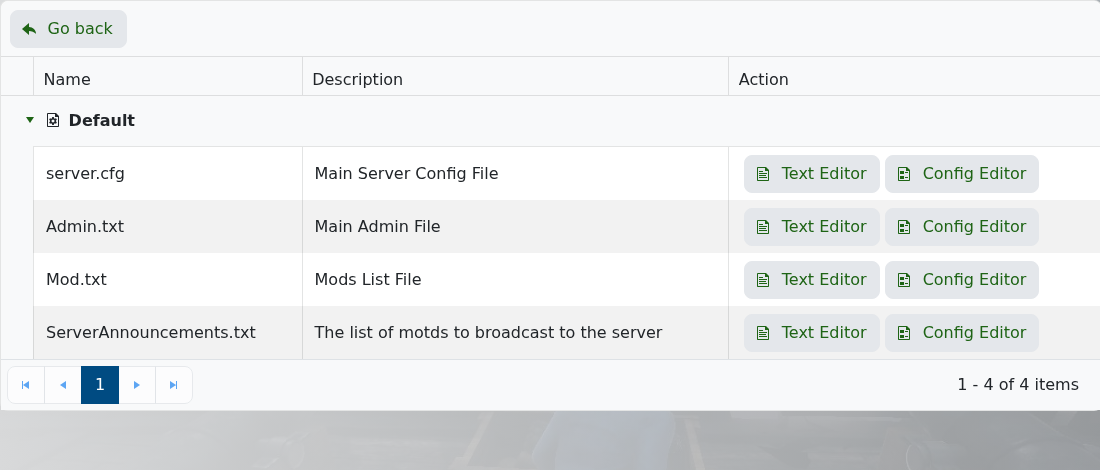
  2. Click Configuration Files. The current panel lists server.cfg, Admin.txt, Mod.txt and ServerAnnouncements.txt.

    Blackwake Configuration Files and their Text Editor and Config Editor buttons

  3. Open the appropriate Config Editor, change only the settings you need and click Save & Exit.
  4. Start the server and test the result before making another group of changes.

The server.cfg editor covers the server name, password, game mode, restart hour, ship speed, player update rate, server-list visibility and friendly-fire options.

  • 0 Users Found This Useful
Was this answer helpful?

Related Articles

How to join your Blackwake server

Add your Blackwake server to Steam favourites with the Query Info address from the LogicServers...

How to add moderators to your Blackwake server

Blackwake stores moderators in Mod.txt. The Config Editor adds each moderator by a display name...

How to become admin on your Blackwake server

Blackwake admins are configured in Admin.txt with a display name and SteamID64. Find your...

How to change your Blackwake server name and password

The public server name and optional join password are at the top of Blackwake's server.cfg Config...

How to change the game mode on your Blackwake server

Blackwake provides its supported game modes as a dropdown in the main Config Editor, so you do...