Set a joining password when you want to keep your Longvinter island for friends. The password is separate from your game control panel login.
- Log in to your game control panel, open your Longvinter service and click Stop. Wait for it to stop before editing
Game.ini, as the running server can overwrite changes. - Open Configuration Files and click Config Editor beside
Game.ini. - Enter your chosen password in Server Password. Use letters and numbers, as required by Longvinter. Leave the field empty to remove an existing joining password.
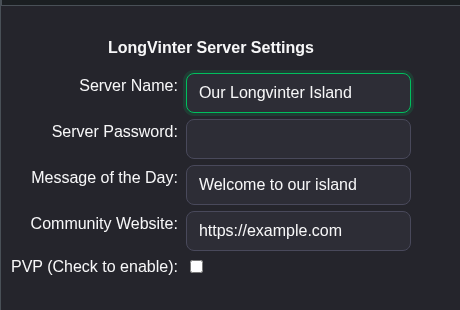
- Click Save & Exit, return to the service page and click Start.
- Give the joining password to your players privately. They need it when connecting to the island.
You can also use Text Editor beside Game.ini. Keep the existing section headings and change the matching line rather than adding a second copy.
[/game/blueprints/server/gi_advancedsessions.gi_advancedsessions_c]
Password=YourChosenPassword
You can also open Saved/Config/WindowsServer/Game.ini through File Manager, or download and edit it using FTP. File Manager opens in the Longvinter folder, so start with Saved.
