Use MaxTents to change how many tents or houses each player can place, and TentDecay to choose whether tents decay. These settings belong to the game mode section of Game.ini.
- Log in to your game control panel, open your Longvinter service and click Stop. Wait for it to stop before editing
Game.ini, as the running server can overwrite changes. - Open Configuration Files and click Text Editor beside
Game.ini. - Find
[/game/blueprints/server/gm_longvinter.gm_longvinter_c]. Change the existing lines, or add them below that heading if they are missing. This example allows three tents or houses per player and disables tent decay.TentDecay=false MaxTents=3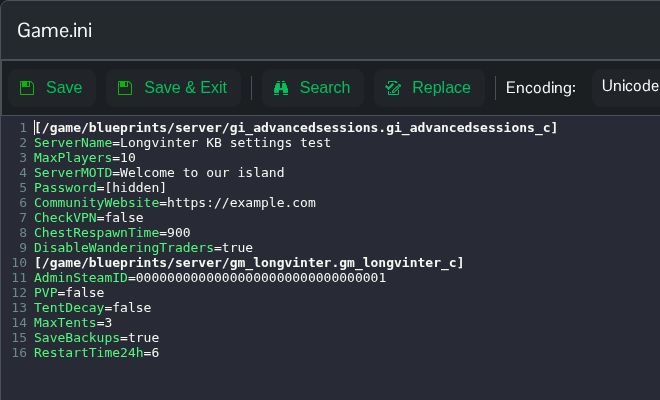
- Click Save & Exit, return to the service page and click Start.
Set TentDecay=true to enable decay again. Keep a copy of your saves before removing existing buildings or starting a fresh island.
You can also open Saved/Config/WindowsServer/Game.ini through File Manager, or download and edit it using FTP. File Manager opens in the Longvinter folder, so start with Saved.
