Unturned 的管理员访问由 Commands.dat 控制。将您的 Steam64 ID 添加为 Owner,然后重启服务器使更改生效。
查找您的 Steam64 ID
- 打开 steamid.io/lookup。
- 粘贴您的 Steam 个人资料 URL 或 Steam 用户名。
- 复制 Steam64 ID 值。
将自己添加为 Owner
- 登录游戏控制面板并打开您的 Unturned 服务器。
- 停止服务器。
- 打开 Configuration Files(配置文件)。
- 在
Commands.dat旁单击 Config Editor。 - 在
Owner/admin 字段中输入您的 Steam64 ID。 - 仅在您也希望启用管理员作弊命令时,在单独的一行添加
Cheats。 - 保存该文件。
- 启动服务器并加入游戏以测试管理员权限。
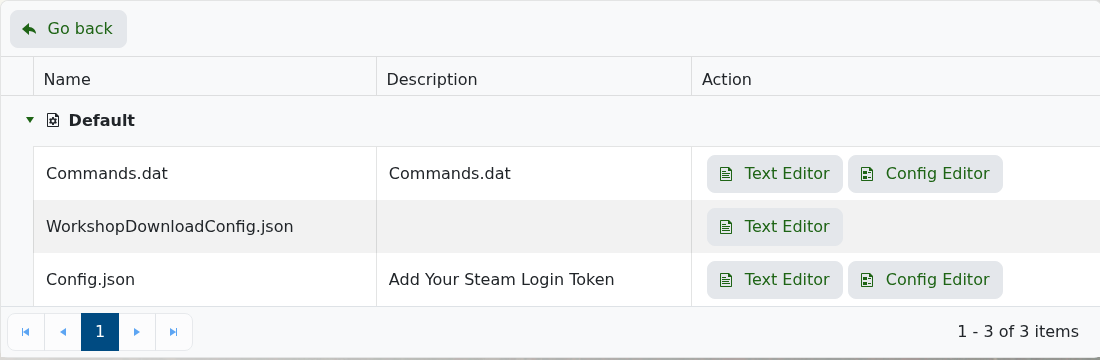
Commands.dat 示例条目
Owner 7656119XXXXXXXXXX
Cheats
将 7656119XXXXXXXXXX 替换为您自己的 Steam64 ID。每个命令保持独立一行。Smartly Dressed Games 的服务器文档使用 Owner 来授予管理员权限,使用 Cheats 来启用作弊命令。
故障排除
- 使用 Steam64 ID,而不是显示名称或短 Steam ID。
- 保存
Commands.dat后重启服务器。 - 如果管理员命令仍然无效,请检查网页控制台或日志查看器以查找启动错误。
