服务器名称、加入密码和管理员密码保存在 GameUserSettings.ini 中。请在服务器停止时编辑该文件,以免正在运行的游戏覆盖您的更改。
- 打开您的 Dark and Light 服务,备份并停止服务器。
- 点击 Configuration Files,然后在
GameUserSettings.ini旁点击 Text Editor。 - 找到
SessionName=并将其值替换为玩家应看到的名称。 - 将
ServerPassword=设置为玩家加入时必须输入的密码。若要运行公开服务器,请将该值留空。 - 将
ServerAdminPassword=设置为用于管理员命令的单独密码。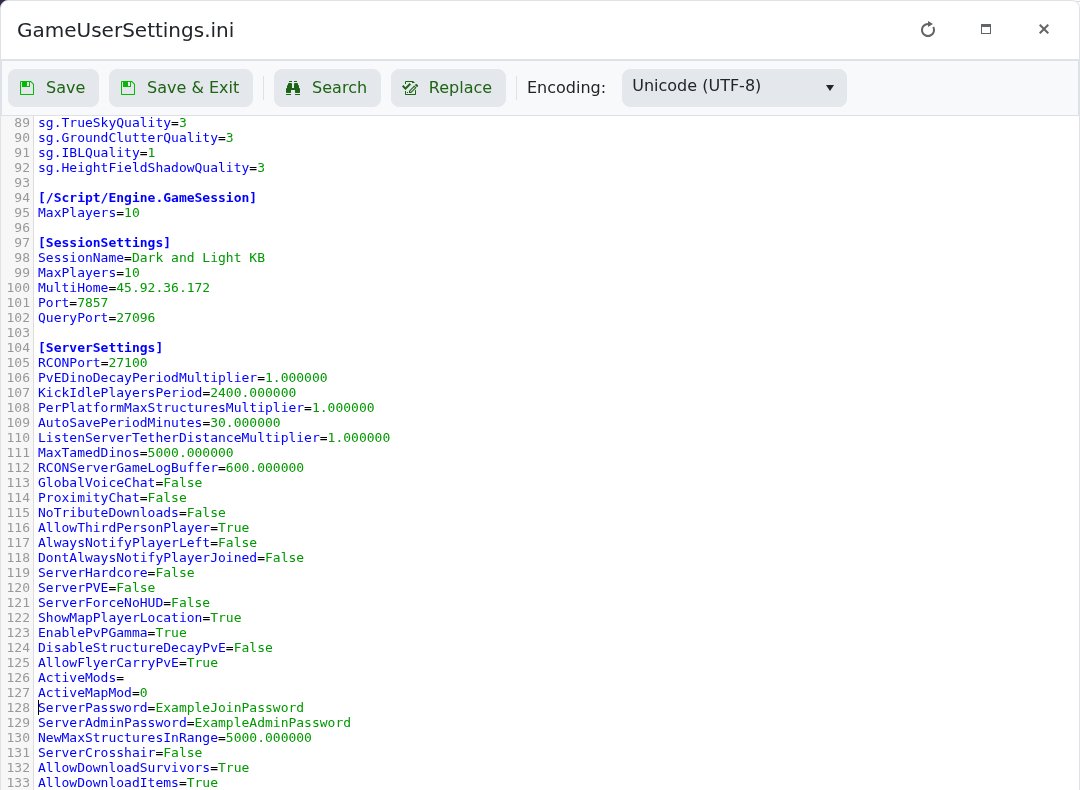
- 点击 Save & Exit,启动服务器并测试新的设置。
不要重复使用您的 LogicServers 或 Steam 密码。如果旧名称在浏览器中短时间残留,请在列表刷新时直接连接。
