如何加入您的 Dark and Light 服务器

列印
  • 0

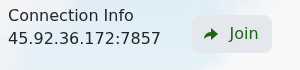
您可以在服务页面使用显示于 Connection Info 下的 IP 地址和端口来启动 Dark and Light。

  1. 打开您的 Dark and Light 服务并确保它正在运行。
  2. 在 Connection Info 旁点击 Join。

    Dark and Light Connection Info 和 Join 按钮

  3. 如果浏览器请求权限,允许其打开 Steam。
  4. 等待 Dark and Light 启动,然后如果已设置服务器密码,请输入。

如果无法连接,请复制完整的 Connection Info 值并检查 IP 地址和端口是否与服务匹配。新启动的服务器可能需要几分钟才能准备就绪。


這篇文章有幫助嗎?

相關文章

« 返回

Follow us on Social Media

Stay in the loop! Follow our social media accounts and stay up-to-date with the latest news, announcements, tips & tricks and behind-the-scenes insights!