The Game.ini Config Editor controls Mordhau's map rotation, game modes, respawn timers and damage multipliers. Change one group at a time so it is easy to reverse a setting that does not suit your server.
- 在控制面板中打开您的 Mordhau 服务器。
- 先备份,然后点击 Configuration Files。
- 在
Game.ini旁点击 Config Editor。 - 在 Respawn Timers 或 Damage Factors 下更改所需值。数值
1表示正常伤害;小于1会减少伤害, 大于1会增加伤害。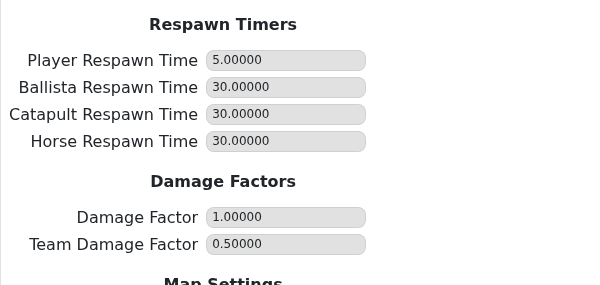
- 在 Map Settings 下,为每个轮换条目选择 Game Mode 和 Map。
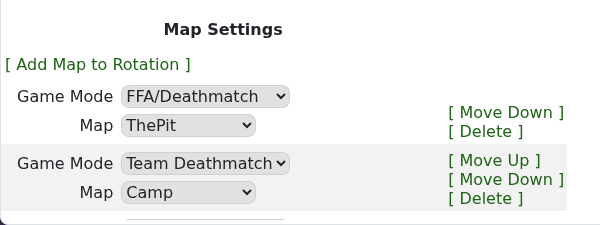
- 使用 Add Map to Rotation 添加新条目,使用 Move Up/Move Down 更改顺序,或使用 Delete 删除。
- 点击 Save & Exit,然后重启服务器。
- 加入游戏并确认第一个地图、模式和游戏数值表现是否符合预期。
推荐的起始设置
- 除非您刻意想要更快或更慢的击杀速度,否则将 Damage Factor 保持为
1。 - 当友军伤害滥用成为问题时,降低 Team Damage Factor。
- 测试时保持较短的轮换列表;一旦每个模式都能正确加载,再添加更多地图。
