如何更改 Don't Starve Together 服务器的玩家上限

列印
  • 0

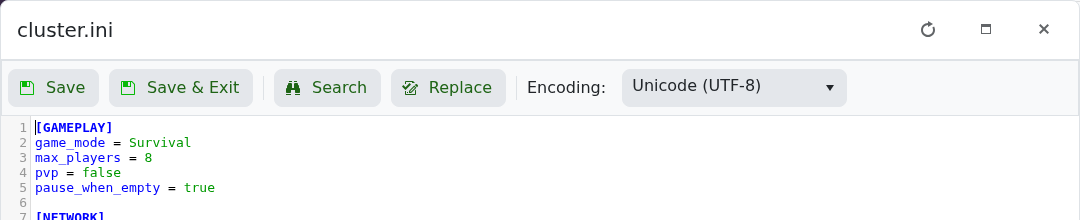
当前的玩家上限保存在 cluster.ini 中的 max_players。请确保该值在您 LogicServers 服务显示的槽位额度内。

  1. 打开该服务并停止服务器。
  2. 点击 配置文件,然后在 cluster.ini 旁点击 文本编辑器。
  3. 在 [GAMEPLAY] 下,将 max_players = 8 中的数字更改为所需的上限。

    Don't Starve Together cluster.ini 游戏玩法部分,显示 max_players

  4. 点击 保存并退出,然后启动服务器。

如果您需要的槽位超过当前服务包含的额度,请先升级服务。更高的玩家上限会增加 CPU 和内存的需求,尤其是在使用 mod 或长期运行的世界中。


這篇文章有幫助嗎?

相關文章

« 返回

Follow us on Social Media

Stay in the loop! Follow our social media accounts and stay up-to-date with the latest news, announcements, tips & tricks and behind-the-scenes insights!