如何更新您的 Smalland 服务器

列印
  • 0

当 Smalland 发布服务器更新或玩家出现版本不匹配时,运行 Steam Update。如果世界或服务器文件有需要保留的更改,请先进行 备份

  1. 在控制面板中打开您的 Smalland 服务器。
  2. 停止服务器并等待其完全离线。
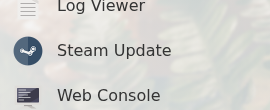
  3. 点击 Steam Update

    Smalland 控制面板,显示 Steam Update 按钮

  4. 确认更新并等待任务完成。
  5. 启动服务器并加入一次以确认其正常加载。

如果更新失败,请保持服务器停止并再运行一次。如果仍然失败,请检查 Web ConsoleLog Viewer,然后通过 提交支持工单 并附上更新输出。


這篇文章有幫助嗎?

相關文章

« 返回

Follow us on Social Media

Stay in the loop! Follow our social media accounts and stay up-to-date with the latest news, announcements, tips & tricks and behind-the-scenes insights!