当只允许受邀玩家加入时,为 Smalland 服务器添加密码。请使用不同于你的 LogicServers 和 Steam 帐户的密码。
- 打开你的 Smalland 服务器并停止它。
- 点击 Commandline Manager,然后打开 Custom Commandlines。
- 编辑所选的命令行,或创建一个新的。
- 在 Server Password 中输入加入密码。
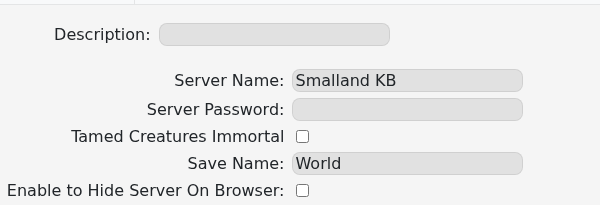
- 保存该命令行,如果是新命令行则选择它。
- 启动服务器并确认在加入时 Smalland 会要求输入密码。
要移除密码,请清空 Server Password,保存,选择该命令行并重启。如果旧密码仍然生效,说明编辑后的命令行可能没有被选中。
