在进行更新、命令行更改或上传存档之前,请为 Smalland 创建备份。先停止服务器可使备份获得当前世界文件的一致副本。
- 在控制面板中打开您的 Smalland 服务器。
- 停止服务器并等待其离线。
- 点击 备份服务器。
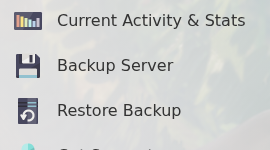
- 如有提示,请确认备份,然后等待任务完成。
- 重新启动服务器。
在备份任务完成之前不要进行任何有风险的更改。随着备份槽被重用,较旧的未锁定备份可能会被删除,因此请将任何无法承受丢失的内容单独下载保存一份。
在进行更新、命令行更改或上传存档之前,请为 Smalland 创建备份。先停止服务器可使备份获得当前世界文件的一致副本。
在备份任务完成之前不要进行任何有风险的更改。随着备份槽被重用,较旧的未锁定备份可能会被删除,因此请将任何无法承受丢失的内容单独下载保存一份。
