TCAdmin 可以按计划检查 Stormforge 服务器是否有更新。请选择玩家较少的时段,并设置玩家在线时任务的处理方式,以免更新意外中断大家的游戏。
- 设置自动更新前,请先备份服务器。
- 在 TCAdmin 中打开 Stormforge 服务,然后点击 Scheduled Tasks。
- 点击 New,在 Task Type 中选择 Steam Update,然后点击 [ New ] 打开任务设置。
- 为任务命名,例如 Daily Stormforge update,并保持 Enabled 处于勾选状态。将 Type 设为 Daily,在 Start 下选择首次运行的日期和时间,并将 Recur Every 设为
1天。取消勾选 Repeat task,即可每天运行一次。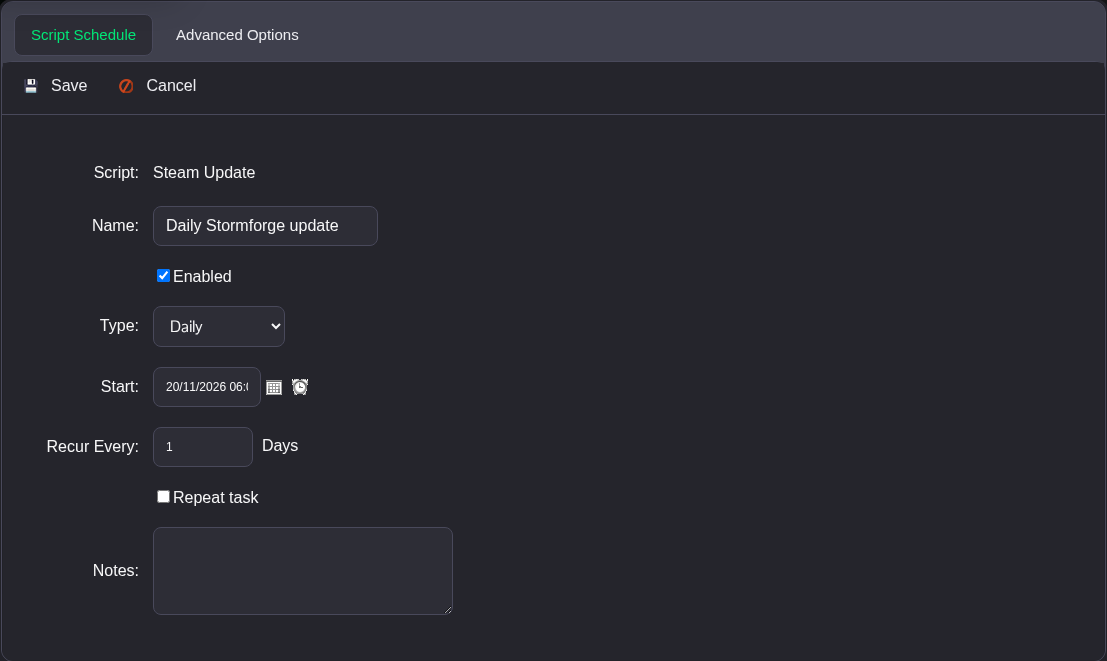
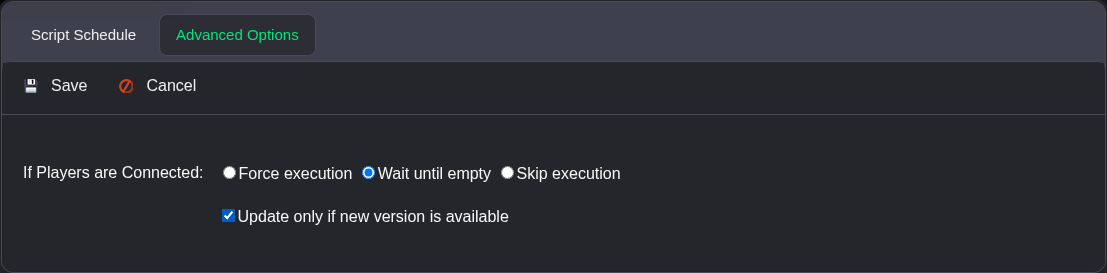
- 打开 Advanced Options。在 If Players are Connected 下选择 Wait until empty,并勾选 Update only if new version is available。
- 点击 Save。返回 Scheduled Tasks 后,确认任务已启用,并且 Next Run Time 是你设定的时间。设置计划时,请使用面板账户中显示的时间。
只要仍有玩家在线,Wait until empty 就会推迟更新。Skip execution 会跳过本次运行,而 Force execution 则允许任务在玩家在线时继续执行。请选择适合你们团队的处理方式;默认的 Force execution 选项可能会中断游戏。
此计划会更新服务器。玩家加入前仍需让 Steam 更新自己的游戏,因为客户端和服务器的版本必须一致。首次运行后,请检查任务的 Last Status 和 Last Run Time。如果需要提前更新,也可以手动运行 Steam Update。
