Karagon 提供 Normal、Easy 和 Very Easy 难度。请选择这些受支持的预设之一,而不要将该值视为不受限制的倍率。
- 在游戏控制面板中停止 Karagon 服务器,并等待显示 Stopped。
- 打开 Configuration Files,然后点击
Settings.ini旁边的 Config Editor。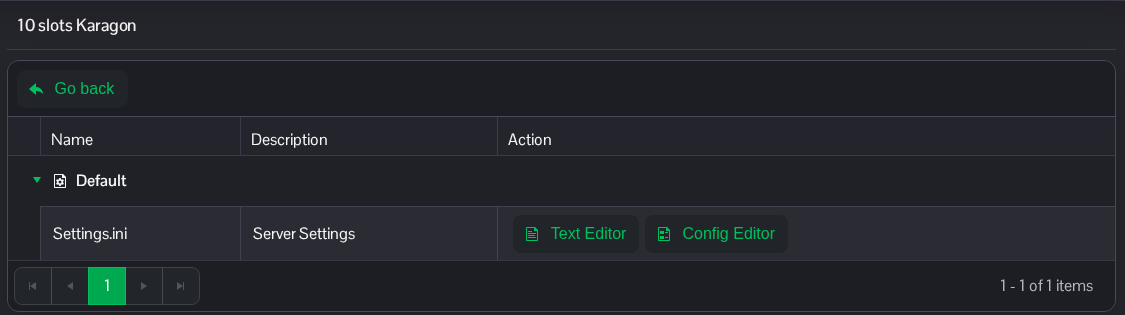
- 在 Difficulty 中选择 Normal、Easy 或 Very Easy。
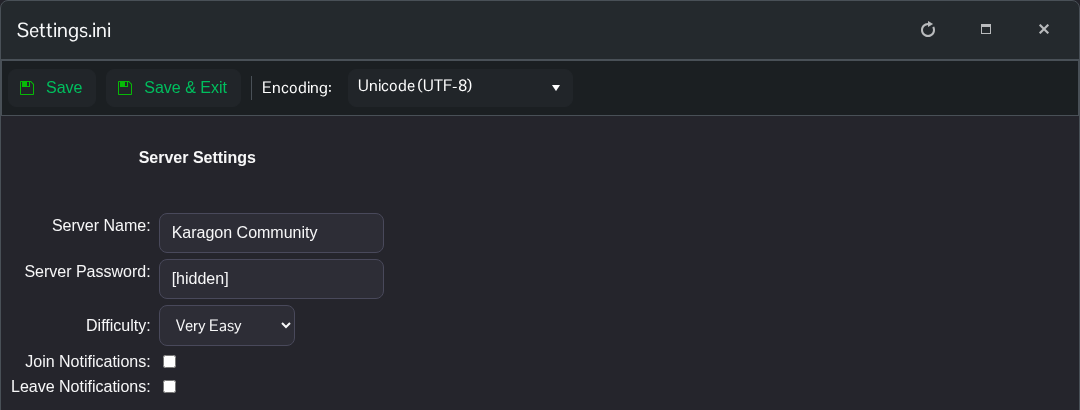
- 点击 Save & Exit,返回服务页面并启动服务器。
手动编辑时,Normal 使用 1.0,Easy 使用 0.5,Very Easy 使用 0.499。开发者提醒,使用其他值可能会导致游戏出错。
如果你想直接编辑文件,请点击 Settings.ini 旁边的 Text Editor,并在现有的 [Settings] 标题下修改以下条目。
[Settings]
Game.Difficulty=0.499
该文件位于 File Manager 中的 NewKaragon/Saved/Config/WindowsServer/Settings.ini。你也可以通过 FTP 传输本地副本。保留其他设置不变。
