Onset 对无响应的玩家设有超时限制,并对每个 IP 地址设有单独的连接数限制。
- 在游戏控制面板中停止 Onset 服务器,并等待显示 Stopped。
- 打开 Configuration Files,然后在
server_config.json旁选择 Text Editor。Onset 请使用 Text Editor。目前,Config Editor 保存的 JSON 无效。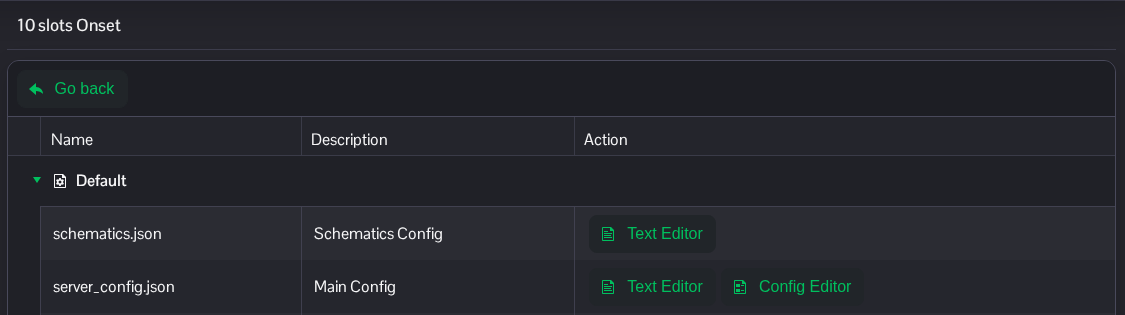
- 将
timeout设为毫秒数,并将iplimit设为单个 IP 地址允许的连接数。示例中的超时时间为 20 秒,每个 IP 地址允许两个连接。修改现有条目,并保留其余 JSON 内容,包括逗号。"timeout": 20000, "iplimit": 2,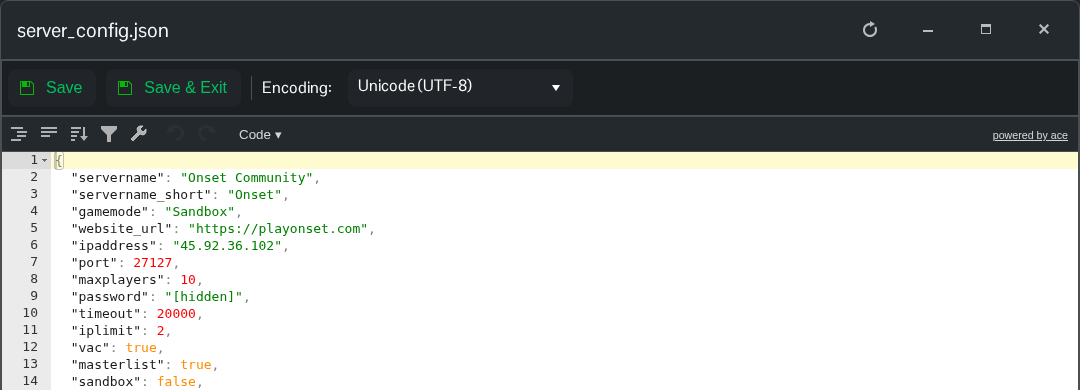
- 点击 Save & Exit,返回服务页面并启动服务器。
请将 timeout 保持在 10000 到 20000 之间,具体以开发者的说明为准。使用同一家庭网络的人通常共用一个公网 IP 地址,因此请为共用该 IP 地址的玩家设置足够的连接数。
server_config.json 文件位于 File Manager 的根目录。如果你想传输本地副本,也可以使用 FTP。
