Path of Titans 使用 Source RCON 远程执行服务器命令。它有独立的密码,以及分配给你的服务的 RCON 端口。
- 打开服务器页面,记下 RCON Info 下的地址和端口。
- 停止服务器,打开 Configuration Files,然后选择
Game.ini旁边的 Text Editor。 - 找到
[SourceRCON]。设置bEnabled=true,并为Password设置你自己的密码,长度至少为八个字符。确保分配的Port值与服务的 RCON Info 中显示的端口一致。请使用你自己的服务所显示的值。[SourceRCON] bEnabled=true Password=ChooseYourOwnRconPassword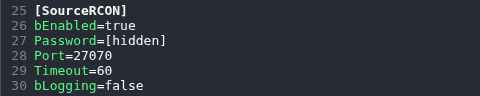
- 点击 Save & Exit,然后启动服务器。
- 使用 Source RCON 客户端连接,并填写服务 IP、RCON Info 中的端口和该密码。例如,mcrcon 可使用以下命令。请将所有占位符替换为你自己的服务信息。
mcrcon -H YOUR_SERVER_IP -P YOUR_RCON_PORT -p YOUR_RCON_PASSWORD help - 发送
help以列出可用命令。输入 RCON 命令时,前面不需要加/或#。
你也可以在 File Manager 的 Saved/Config/WindowsServer/Game.ini 中找到 Game.ini。文件传输也可以使用 FTP。
