如何下载 Path of Titans 服务器日志

列印
  • 0

需要排查启动、配置或服务器错误时,请下载 PathOfTitans.log。

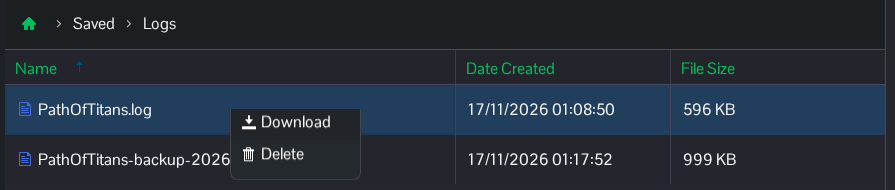
  1. 打开 File Manager,前往 Saved/Logs。你也可以使用 FTP访问此文件夹。
  2. 选择 PathOfTitans.log。文件名中带有日期的备份文件属于之前的会话。
  3. 右键单击当前文件,然后选择 Download。在文本编辑器中打开文件,并检查问题发生时间附近的条目。

    Path of Titans 文件管理器,显示当前的 PathOfTitans.log 和 Download 操作

分享文件前请先检查内容。启动和身份验证日志可能包含私人密码、主机托管令牌和帐户详细信息;分享副本前请删除这些值。

這篇文章有幫助嗎?

相關文章

« 返回

Follow us on Social Media

Stay in the loop! Follow our social media accounts and stay up-to-date with the latest news, announcements, tips & tricks and behind-the-scenes insights!