Arma Reforger 的跨平台功能由 server_config.json 控制。重要的字段是 game.crossPlatform 和 game.supportedPlatforms。
- 在控制面板中打开您的 Arma Reforger 服务器。
- 单击 配置文件。
- 使用 文本编辑器 打开
server_config.json。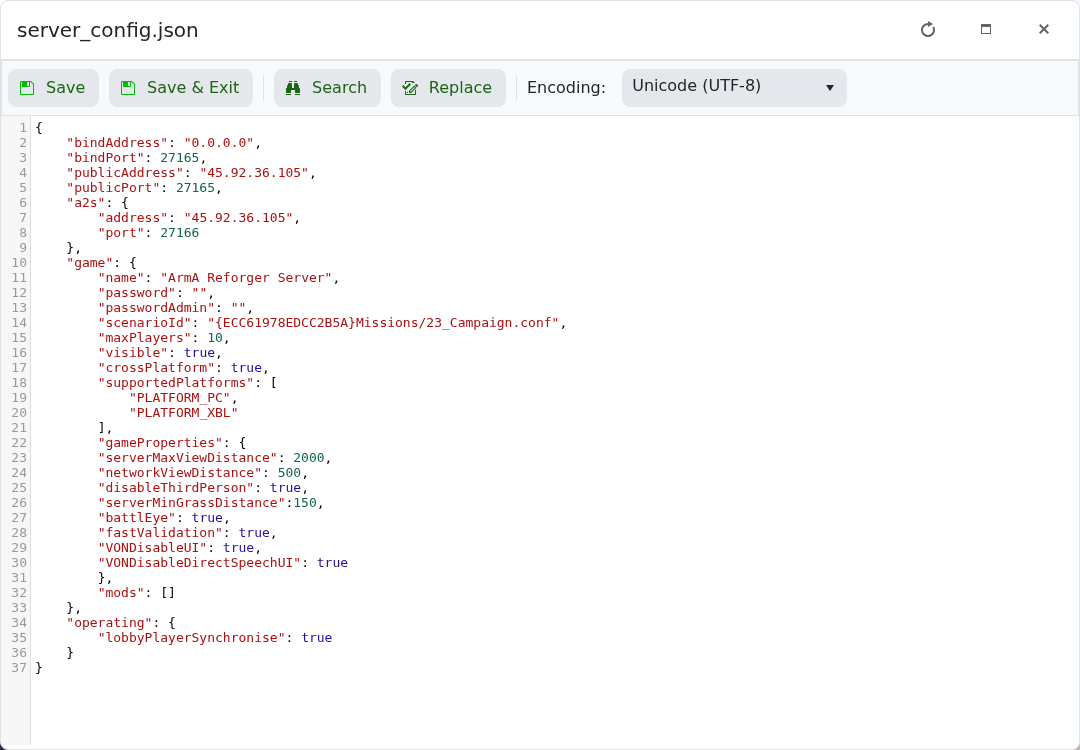
- 将
crossPlatform设置为true或false。 - 将
supportedPlatforms设置为您想允许的平台。 - 单击 保存并退出,然后重启服务器。
示例:启用 PC 和 Xbox:
"crossPlatform": true,
"supportedPlatforms": [
    "PLATFORM_PC",
    "PLATFORM_XBL"
]
如果您只想允许 PC 玩家,请删除 Xbox 条目,并根据您社区希望的行为设置跨平台选项。
更改设置后
重启服务器并在游戏客户端中测试该设置。如果该更改影响加入、权限、PvP、跨平台或管理员访问,请让其他玩家也进行测试。
如果设置未生效
确认该值已保存到正确的配置文件或面板字段。有些游戏只在启动时读取这些设置,因此需要完全重启才能使更改生效。
