Arma Reforger 服务器的模组是从 server_config.json 中的 mods 数组加载的。在此面板上,使用 JSON 配置方法,而不是 Mod Manager 或 Steam Workshop 页面。
- 首先进行备份。
- 打开模组页面,复制模组作者要求的模组 ID、名称和版本。
- 在控制面板中打开您的 Arma Reforger 服务器。
- 点击配置文件。
- 使用文本编辑器打开
server_config.json。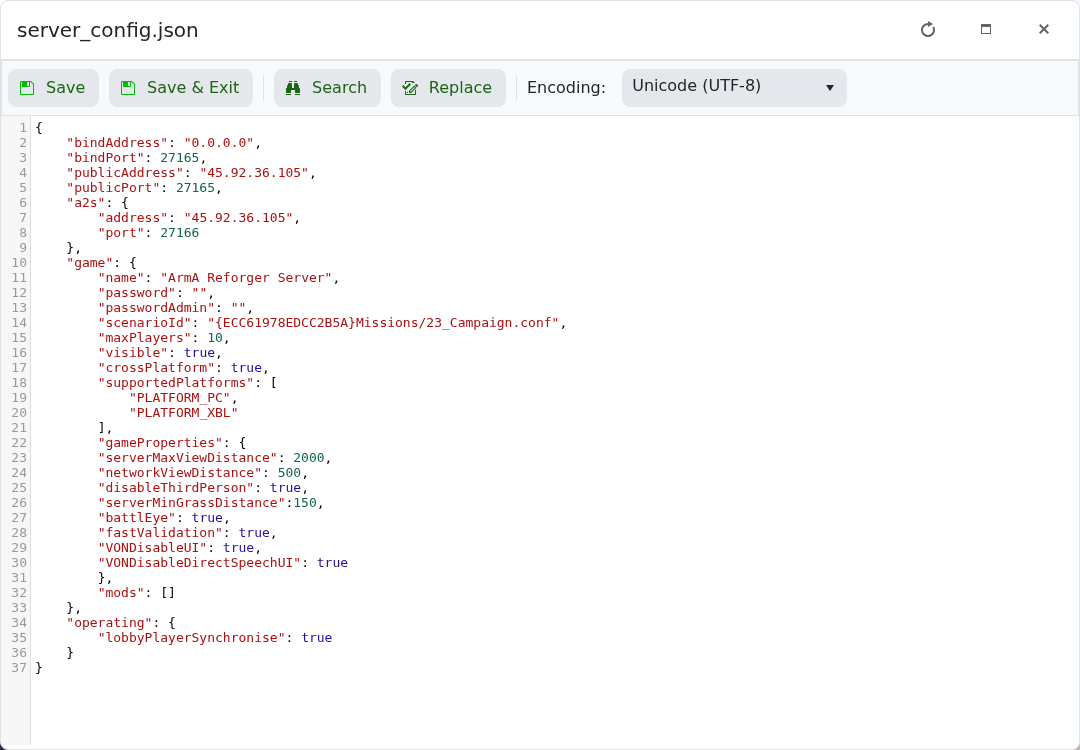
- 在
mods数组中添加模组条目。 - 点击保存并退出,然后重启服务器。
示例格式:
"mods": [
    {
        "modId": "MOD_ID_HERE",
        "name": "Mod Name",
        "version": "1.0.0"
    }
]
每个模组条目必须是有效的 JSON。如果添加多个模组,请用逗号分隔每个模组对象。如果在添加模组后服务器无法启动,请恢复备份或删除您添加的最后一个模组条目。
