How to become an admin on your Outlaws of the Old West server

Administrator access is controlled by AdminList.txt. Each administrator must be listed by their 17-digit SteamID64.

  1. Find your SteamID64 from your Steam profile URL or a Steam ID lookup service.
  2. Stop the server and open Configuration Files.
  3. Click Text Editor beside AdminList.txt.
  4. Enter one SteamID64 per line, then save the file and start the server.
76561198000000000
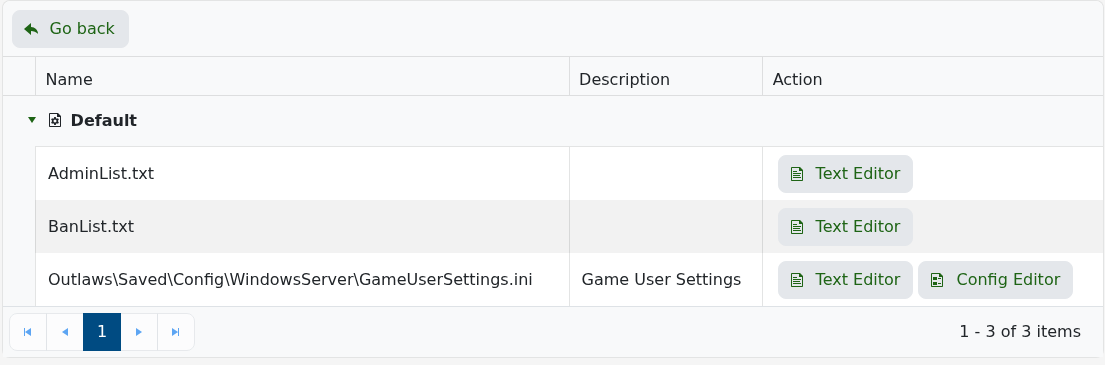
Outlaws of the Old West AdminList.txt and BanList.txt editors

Join the server with the same Steam account and open the console with Shift + ~. If commands are rejected, check every digit, make sure the ID is on its own line and restart once more. An existing administrator can instead run RefreshAdminTextList after the file is saved.

  • 8 Users Found This Useful
Was this answer helpful?

Related Articles

How to edit the ban list on your Outlaws of the Old West server

Outlaws of the Old West reads banned players from BanList.txt. The current panel exposes this...

Admin commands for your Outlaws of the Old West server

Join with a Steam account listed in AdminList.txt, then press Shift + ~ to open the in-game...

How to join your Outlaws of the Old West server

The service page shows the game address and a separate query address. Use the Join button beside...

How to back up your Outlaws of the Old West server

Create a backup before changing administrator lists, editing configuration, updating the game or...

How to restore an Outlaws of the Old West server backup

Restoring a backup replaces current server files with an earlier copy. Player and world progress...