How to enable peaceful mode, friendly fire and keep inventory in Smalland

Smalland’s custom command line includes switches for peaceful mode, friendly fire, keeping inventory after death, item deterioration and immortal tamed creatures.

  1. Open your Smalland server and stop it.
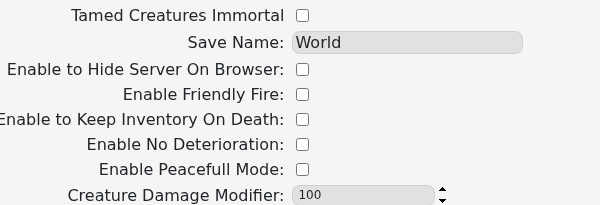
  2. Click Commandline Manager, open Custom Commandlines, then edit the selected entry or create a new one.
  3. Tick the options you want to enable:

    Smalland command-line switches for browser visibility, friendly fire, inventory, deterioration and peaceful mode

  4. Save the command line and select it if it is new.
  5. Start the server and test the changed behaviour in-game.

Peaceful Mode changes creature aggression, Keep Inventory On Death preserves player inventory, and No Deterioration prevents normal deterioration. Enable one change at a time on an established world so you can confirm its effect.

  • 0 Users Found This Useful
Was this answer helpful?

Related Articles

How to update your Smalland Server

Run Steam Update when Smalland releases a server update or players receive a version mismatch....

How to change the name of your Smalland Server

Change the name players see in Smalland through the selected custom command line. Open your...

Adding a password to your Smalland Server

Add a Smalland server password when only invited players should be able to join. Use a different...

How to join a Smalland Server

Join your Smalland server through the in-game server browser using the name configured in the...

How to backup your Smalland Server

Create a Smalland backup before updates, command-line changes or save uploads. Stopping the...