How to change creature damage, day length and seasons in Smalland

Use the Smalland custom command line to change creature damage and health, fall damage, day and season length, and nourishment loss. The panel’s default modifier value is 100.

  1. Open your Smalland server and stop it.
  2. Click Commandline Manager, then edit the selected custom command line or create a new one.
  3. Change the required modifier or duration. Day and season values are entered in seconds.
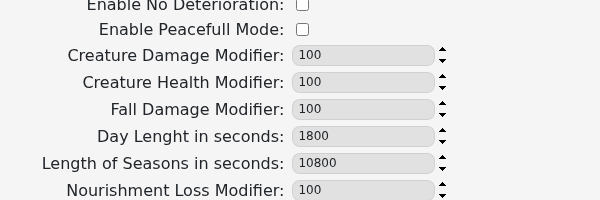
    Smalland command-line fields for damage, health, day length, season length and nourishment loss

  4. Save the command line and select it if it is new.
  5. Start the server and test the result before changing further values.

Keep a note of the original values and make modest changes first. Extreme values can make survival unexpectedly easy or difficult, and a saved command line will not affect the server until it is selected.

  • 0 Users Found This Useful
Was this answer helpful?

Related Articles

How to update your Smalland Server

Run Steam Update when Smalland releases a server update or players receive a version mismatch....

How to change the name of your Smalland Server

Change the name players see in Smalland through the selected custom command line. Open your...

Adding a password to your Smalland Server

Add a Smalland server password when only invited players should be able to join. Use a different...

How to join a Smalland Server

Join your Smalland server through the in-game server browser using the name configured in the...

How to backup your Smalland Server

Create a Smalland backup before updates, command-line changes or save uploads. Stopping the...