How to make yourself an admin on your Avorion server

Avorion identifies the server administrator with a SteamID64. This is the 17-digit Steam account ID, not the player name or profile URL.

  1. Copy your SteamID64 from your Steam account details or a trusted Steam ID lookup.
  2. Open the Avorion service, stop it and click Configuration Files.
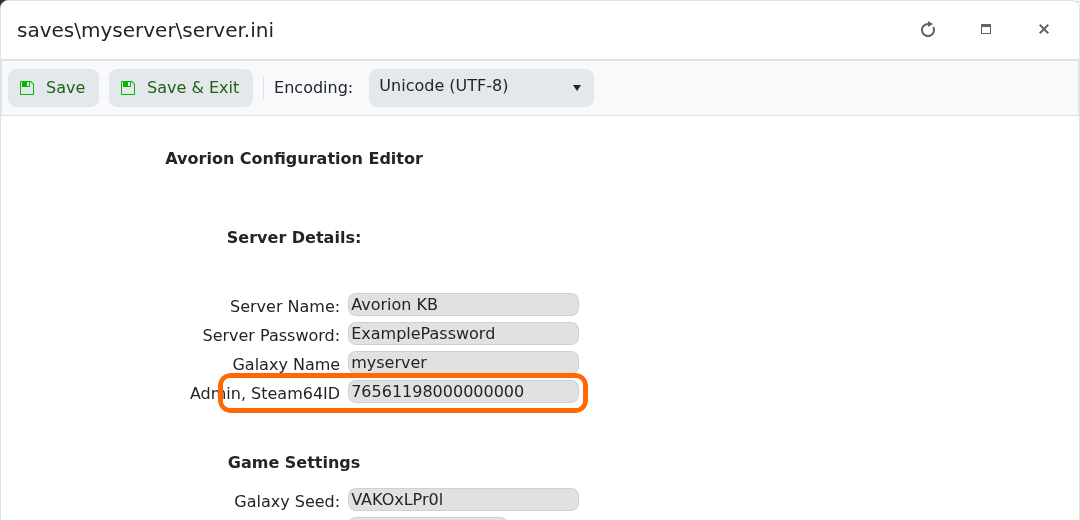
  3. Open the Config Editor for saves\myserver\server.ini and enter the ID in Admin, Steam64ID.

    Admin Steam64ID field highlighted in the Avorion Config Editor

  4. Click Save & Exit, start the server and reconnect.

If admin access is not applied, check that all 17 digits were copied and that you restarted the server after saving.

  • 0 Users Found This Useful
Was this answer helpful?

Related Articles

Commands for your Avorion server

These Avorion commands and server options are a quick reference for server administration....

How to configure your Avorion server

Most Avorion server settings can be changed through the Config Editor for server.ini. Stop the...

How to connect to your Avorion server

You can join an Avorion server directly with the IP address and port shown in the LogicServers...

How to change your Avorion server name and password

The Avorion server name and join password are both available near the top of the server.ini...

How to change Avorion difficulty and gameplay settings

Avorion's Config Editor groups the main galaxy and gameplay options together, including...